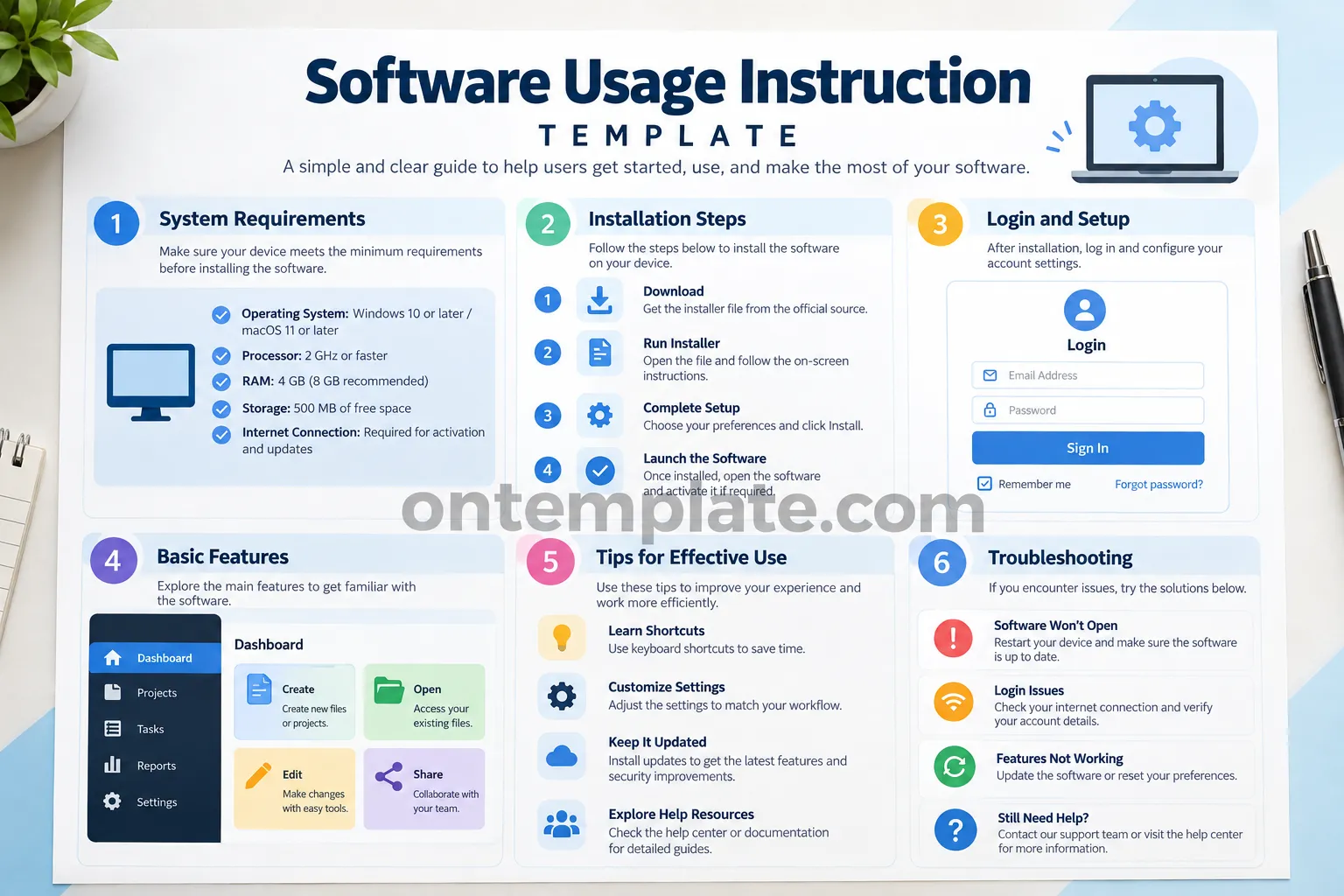
A Software Usage Instruction Template makes it easier to explain how software should be installed, configured, and used. Instead of creating instructions from scratch every time, you can use a structured template to organize important information into clear and practical steps.
Whether you are documenting business software, an internal company application, desktop program, web-based platform, or a new digital tool, well-written instructions can reduce confusion and help users become productive faster. A good software instruction document should answer the questions users are most likely to ask, from system requirements and installation to basic features, troubleshooting, and support.
This guide explains what a software usage instruction template should contain, how to structure one effectively, and practical tips for creating documentation that is easy to understand and follow.
What Is a Software Usage Instruction Template?
A Software Usage Instruction Template is a pre-structured document used to create step-by-step instructions for using a software application. It provides a consistent framework for presenting technical information without requiring the writer to design the entire document from the beginning.
A typical software instruction template may include sections such as:
- Software name and version
- System requirements
- Installation instructions
- Login and account setup
- Basic software features
- Step-by-step usage instructions
- Tips for effective use
- Common problems and troubleshooting
- Frequently asked questions
- Technical support information
The structure can be adapted to suit different types of software. A simple application may only require a few pages, while enterprise software may need detailed procedures for different user roles and workflows.
Why Use a Software Usage Instruction Template?
Creating software documentation from a blank page can take considerable time. A template provides a starting point that helps you focus on the actual information users need rather than spending unnecessary time deciding how the document should be organized.
1. Saves Time
A ready-made structure allows you to fill in relevant information quickly. You can replace placeholder content with your software’s actual requirements, features, procedures, and troubleshooting solutions.
2. Improves Consistency
When several applications or departments require documentation, using a consistent format makes the instructions easier to recognize and navigate. Users know where to look for installation information, feature explanations, or troubleshooting advice.
3. Makes Instructions Easier to Follow
A well-organized template separates complex information into manageable sections. Numbered steps, headings, checklists, and concise explanations can make technical procedures less intimidating for beginners.
4. Supports Training and Onboarding
Software instructions can become useful training material for employees, students, customers, and new team members. Instead of relying entirely on verbal explanations, organizations can provide users with a document they can consult whenever they need assistance.
Essential Sections of a Software Usage Instruction Template
The exact structure depends on the software, but several sections are particularly useful for most software instruction documents.
System Requirements
Start by explaining what users need before installing or accessing the software. Include supported operating systems, processor requirements, memory, storage, internet connectivity, browser requirements, and other technical prerequisites when applicable.
Clearly separating minimum requirements from recommended requirements can also help users determine whether their device is suitable.
Installation Instructions
Provide a simple sequence of installation steps. Each step should explain one specific action rather than combining several unrelated actions into a single paragraph.
- Download the appropriate installer.
- Open the installation file.
- Review and accept the required terms.
- Select the installation location if necessary.
- Complete the installation process.
- Launch the software.
If installation differs between Windows, macOS, Linux, mobile devices, or web browsers, consider creating separate subsections for each platform.
Login and Initial Setup
Explain what users should do after installation. This section can cover account creation, login procedures, password requirements, activation, license keys, permissions, profile settings, and initial configuration.
Avoid assuming that users already understand the terminology used by the software. Explain unfamiliar terms briefly when they first appear.
Basic Features
Introduce the main features users need to understand. Focus on practical functions rather than listing every capability the software offers.
For example, you might explain how users can create a project, upload a file, edit information, generate a report, change settings, or collaborate with other users.
For complicated software, organize features according to user goals. This approach is often more useful than simply following the order in which buttons appear on the screen.
How to Write Effective Software Usage Instructions
Good documentation is not only about having the right information. The information must also be presented in a way that users can understand quickly.
Use Clear and Direct Language
Write instructions using simple sentences and familiar words whenever possible. Instead of writing a long explanation, tell the user exactly what to do.
For example, use phrases such as “Open the Settings menu and select Account” instead of an unnecessarily complicated explanation of the navigation process.
Use Numbered Steps for Procedures
Numbered instructions are particularly effective when users need to complete actions in a specific order. Each step should normally contain one primary action.
- Open the application.
- Select Settings.
- Choose Account.
- Enter your account information.
- Select Save.
This format makes it easier for readers to follow the procedure and identify where they are if they encounter a problem.
Explain What the User Should Expect
When useful, explain what should happen after an action. For example, after selecting an installation button, you could mention that an installation progress window should appear.
Expected results help users determine whether they completed a step successfully.
Keep Each Section Focused
Avoid placing installation instructions, feature descriptions, and troubleshooting information in the same section. Clear separation improves readability and makes the document easier to scan.
Practical Tips for Better Software Documentation
Once the basic instructions are complete, several improvements can make your document more useful.
- Use consistent terminology: Always use the same name for buttons, menus, features, and settings.
- Keep steps short: Break complicated procedures into smaller actions.
- Highlight important information: Use bold text for warnings, menu names, and critical actions.
- Update version information: Record the software version and documentation update date.
- Include troubleshooting: Address common errors instead of forcing users to search elsewhere.
- Test every procedure: Follow your own instructions from beginning to end before publishing them.
- Write for beginners: Do not assume that every reader has technical experience.
Common Mistakes to Avoid
Even technically accurate documentation can be difficult to use if it is poorly structured. Avoid writing instructions that contain excessive jargon, overly long paragraphs, or missing steps.
Another common mistake is failing to update documentation after a software interface changes. A button may move, a menu may receive a new name, or an installation process may be redesigned. Outdated instructions can create more confusion than having no documentation at all.
It is also important to avoid explaining only what a feature does without explaining how users can apply it. Practical examples and task-based instructions generally make documentation more useful.
Software Usage Instruction Template for Different Users
A single document may not be appropriate for every audience. Consider adapting your instructions according to the reader’s role and technical knowledge.
For Employees
Focus on workflows employees perform regularly. Include login instructions, daily tasks, company-specific procedures, security requirements, and support contacts.
For Customers
Customer documentation should prioritize quick setup, essential features, common questions, and troubleshooting. Avoid unnecessary internal technical details.
For Students
Educational software instructions should use beginner-friendly explanations and clear examples. Screenshots, checklists, and simple step-by-step procedures can make learning easier.
For Technical Teams
Technical users may need more detailed information, including configuration options, integrations, permissions, system dependencies, and error-handling procedures.
How to Customize a Software Usage Instruction Template
Start by identifying the main tasks your users need to complete. Then adapt the template around those tasks rather than trying to include every possible piece of information.
A practical customization process is:
- Identify your target audience.
- List the most important user tasks.
- Collect the required technical information.
- Organize procedures in logical order.
- Add troubleshooting information for common issues.
- Review the document for clarity and consistency.
- Test the instructions with someone unfamiliar with the software.
- Update the document whenever the software changes.
This approach helps create documentation that is both comprehensive and easy to use.
Final Checklist Before Publishing
Before distributing your software instructions, review the document carefully. Make sure the software name and version are correct and that all important procedures have been tested.
- Are the system requirements accurate?
- Are installation steps complete?
- Can a new user follow the instructions without additional help?
- Are menus and buttons named consistently?
- Are common errors addressed?
- Is the language clear and concise?
- Is the document visually easy to scan?
- Is the support or contact information current?
- Has the document been reviewed after the latest software update?
Conclusion
A Software Usage Instruction Template provides a practical foundation for creating clear, organized, and reusable software documentation. By including system requirements, installation procedures, account setup, feature explanations, usage tips, and troubleshooting information, you can give users the guidance they need at every stage of the software experience.
The most effective instructions are simple, task-focused, consistent, and regularly updated. Whether you are documenting software for employees, customers, students, or technical teams, starting with a structured template can save time while improving the overall user experience.
Use the template as a flexible starting point, customize it for your specific software and audience, and test the final instructions before publishing them. With the right structure, even complex software processes can become easier for users to understand and follow.
Yoast Readability Analysis: Green-targeted structure. The article uses short paragraphs, descriptive subheadings, transition-friendly flow, active and direct language, lists for scannability, and clear sentence structures. It is designed to support readability and SEO without excessive keyword repetition.
