A Property Broker BI Template can help real estate professionals organize property information, client requirements, brokerage details, and transaction-related notes in one clear format. Instead of creating documents from scratch for every property or client, brokers can use a structured template to keep essential information consistent and easy to review.
For property brokers, organization matters. A typical workflow may involve property listings, buyer or tenant requirements, property specifications, pricing information, brokerage agreements, contact details, and follow-up notes. A well-designed property broker template provides a practical framework for recording these details without making the process unnecessarily complicated.
Whether you work independently or as part of a real estate agency, a printable property broker template can support a more consistent approach to everyday administrative tasks.
What Is a Property Broker BI Template?
A Property Broker BI Template is a structured document designed to help brokers collect and organize information related to real estate properties and clients. The template can be adapted for residential properties, commercial real estate, land, apartments, condominiums, and other property types.
The “BI” element can be used as a flexible business-information framework, allowing brokers to bring important information together in an organized document. Depending on the workflow, the template may contain sections for property details, client preferences, pricing, location, features, notes, and brokerage information.
Information Commonly Included
- Property address and identification information
- Property type and size
- Bedrooms and bathrooms for residential listings
- Asking price or estimated property value
- Property features and highlights
- Client contact information
- Buyer or tenant preferences
- Preferred location and budget range
- Brokerage agreement information
- Additional notes and follow-up requirements
Why Use a Property Broker Template?
Real estate brokerage involves managing many details at the same time. A reusable template can reduce the amount of time spent deciding how information should be arranged and make important details easier to locate.
Instead of maintaining scattered notes, brokers can use a standardized property information sheet for each listing or client. This can make internal organization easier and provide a consistent format when reviewing properties with clients or colleagues.
Improve Information Organization
A structured template separates information into logical sections. Property specifications can be kept apart from client preferences, while pricing and notes can be recorded in clearly defined areas.
This approach can be especially useful when a broker is handling multiple listings. Consistent formatting makes it easier to compare documents and identify missing information.
Save Time on Repetitive Tasks
Creating a new document from a blank page for every client or property can become repetitive. A reusable property broker document provides a starting point that can be customized as needed.
Once the standard sections are prepared, the broker only needs to enter the relevant information rather than rebuilding the entire document.
Key Sections of a Property Broker BI Template
The most useful template is one that reflects the information brokers actually need during their daily workflow. While requirements vary between businesses, several sections are particularly practical.
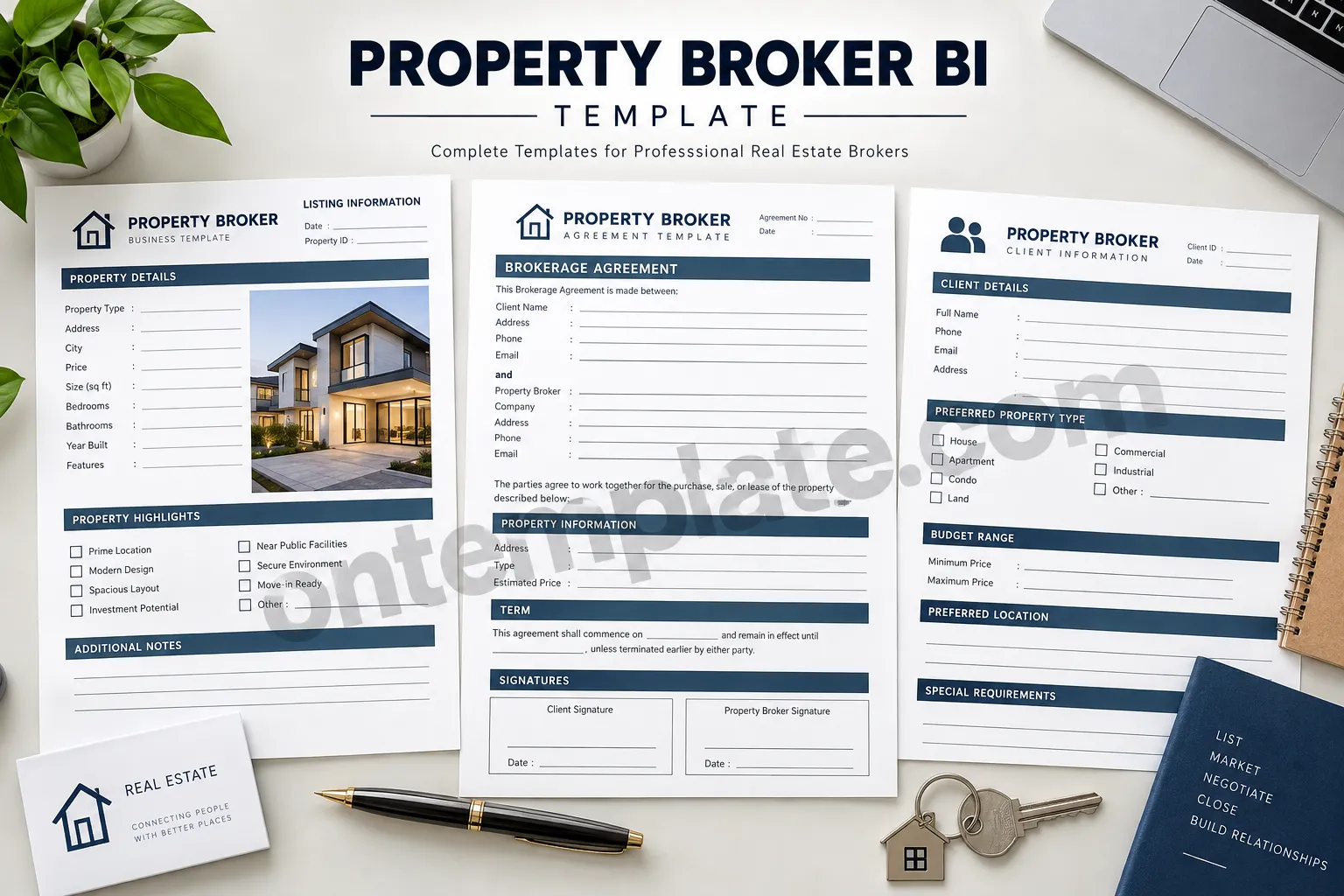
1. Property Details
This section records the basic information about the property. It may include the address, property type, size, year built, number of bedrooms and bathrooms, asking price, and other identifying information.
Keeping these details together creates a quick reference that can be reviewed without searching through multiple documents.
2. Property Highlights
A property listing often contains features that are important to potential buyers or tenants. A highlights section can be used to record characteristics such as location advantages, modern design, parking, accessibility, nearby facilities, investment potential, or other relevant features.
3. Client Information
Client information can include a name, contact details, preferred property type, preferred location, budget range, and special requirements. Recording these preferences systematically can make property matching more organized.
4. Brokerage Agreement Information
Where appropriate, a brokerage template can include a dedicated area for agreement details, dates, parties involved, property information, terms, and signatures. Any agreement used in an actual transaction should be reviewed and adapted to comply with applicable laws and professional requirements.
5. Notes and Follow-Up
A notes section gives brokers room to record observations, questions, client feedback, next steps, or other information that does not fit neatly into predefined fields.
How to Use a Property Broker BI Template Effectively
A template becomes more useful when it is incorporated into a consistent workflow. The following practices can help keep property and client records organized.
- Complete essential fields first: Record the property address, type, price, and key contact information before adding secondary details.
- Use consistent terminology: Keep property types, status labels, and other recurring categories consistent across documents.
- Update information promptly: Review pricing, availability, contact details, and property specifications when circumstances change.
- Keep notes concise: Record actionable information rather than filling the document with unnecessary text.
- Review documents regularly: Check templates for incomplete fields or outdated information.
- Protect confidential information: Store client and transaction information securely and follow applicable privacy requirements.
Property Broker BI Template for Different Real Estate Workflows
A flexible template can be adapted to different types of brokerage activity. The information needed for a residential property may differ from the information required for a commercial listing, but the underlying organizational structure can remain similar.
Residential Real Estate
For houses, apartments, and condominiums, useful fields can include bedrooms, bathrooms, floor area, amenities, parking, neighborhood information, and asking price.
Commercial Property
Commercial brokers may need fields for usable area, property classification, occupancy, lease information, zoning considerations, parking capacity, and other business-related characteristics.
Land and Development Opportunities
For land transactions, brokers may need to document plot size, location, access, zoning information, development considerations, asking price, and relevant notes.
Tips for Creating a Professional Property Broker Document
A professional template should be easy to read as well as functional. Overly complicated layouts can make data entry harder, particularly when the document is printed or completed manually.
Use clear headings, adequate spacing, simple typography, and logical sections. Important information should be easy to find at a glance. Checkboxes can work well for recurring property characteristics, while blank lines or text fields can provide flexibility for unique information.
A printable design can also be useful for meetings, property inspections, client consultations, and situations where handwritten notes are more convenient than digital entry.
Benefits of Using a Printable Property Broker Template
Digital tools are useful for managing real estate information, but printable documents still have practical applications. A printed property broker template can be taken to property viewings, meetings, inspections, and client consultations.
It can also serve as a temporary working document before information is transferred into a digital database or customer relationship management system.
Another advantage is simplicity. A printable form does not require a complicated setup and can be customized for different properties or clients as required.
How to Customize Your Property Broker BI Template
Every brokerage business has different processes, so customization can make a template more useful. Consider adding fields that correspond directly to your workflow while removing sections that you rarely use.
- Add your brokerage name and contact information.
- Include fields for your preferred property categories.
- Add transaction or listing status fields if useful.
- Include space for client-specific requirements.
- Adjust sections for residential, commercial, or land properties.
- Add branding elements that match your professional identity.
When customizing a template, avoid adding too many fields simply because they might be useful someday. A concise document is generally easier to complete and maintain.
Common Mistakes to Avoid
One common mistake is creating a template that contains too much information. If users have to work through dozens of unnecessary fields, the document can become inconvenient rather than helpful.
Another issue is inconsistent information. Property prices, availability, addresses, and contact details can change, so records should be reviewed whenever important information changes.
It is also important not to treat a general template as a substitute for professional legal documentation. Brokerage agreements, disclosures, and transaction documents may have specific requirements depending on the jurisdiction and type of transaction.
Conclusion
A Property Broker BI Template provides a practical framework for organizing property, client, and brokerage information. By bringing essential details into a consistent format, it can help brokers reduce repetitive administrative work and maintain clearer records.
The most effective template is simple, adaptable, and aligned with the broker’s actual workflow. Whether used as a printable property information sheet, client requirement form, brokerage worksheet, or starting point for a digital record, a structured template can make everyday real estate tasks easier to manage.
For brokers looking to standardize their documentation, a clean and customizable property broker template can be a useful addition to their real estate toolkit.
