A room rent invoice is a practical document that helps landlords, property managers, and room rental businesses clearly record rent charges and communicate payment details to tenants. Instead of relying on informal messages or handwritten receipts, a professional invoice gives both parties a clear record of what is owed, when payment is due, and what services or additional charges are included.
Whether you rent out a single room, manage shared housing, operate a boarding house, or handle multiple rental properties, using a consistent invoice format can make monthly billing easier. A well-designed room rent invoice template can also save time because you only need to update the tenant information, rental period, charges, and payment details for each billing cycle.
This guide explains what a room rental invoice should include, how to create one, and how a reusable template can make rental administration more organized.
What Is a Room Rent Invoice?
A room rent invoice is a billing document issued to a tenant for a specific rental period. It normally identifies the landlord or property manager, the tenant, the rented room, the amount of rent, the payment deadline, and any additional charges.
Depending on the rental agreement, an invoice may include more than basic monthly rent. Common additional charges include electricity, water, internet, cleaning fees, parking, maintenance charges, or other agreed services.
The main purpose of a rental invoice is to make the payment obligation easy to understand. It can also provide a useful financial record for both the property owner and tenant.
Why Use a Room Rent Invoice Template?
Creating every rental invoice from scratch can be repetitive, especially when you manage several rooms or properties. A reusable invoice template provides a standardized structure that can be updated quickly each month.
- Saves time: Tenant and property information can be entered into an existing layout.
- Improves organization: Each billing period can follow the same format.
- Reduces mistakes: Important fields are less likely to be forgotten.
- Looks professional: A consistent invoice creates a clearer billing experience.
- Improves record keeping: Invoices can be saved and organized by tenant and rental period.
- Clarifies additional charges: Rent, utilities, and other fees can be separated into individual line items.
For landlords who issue invoices regularly, a template can turn a time-consuming monthly task into a simple update-and-send process.
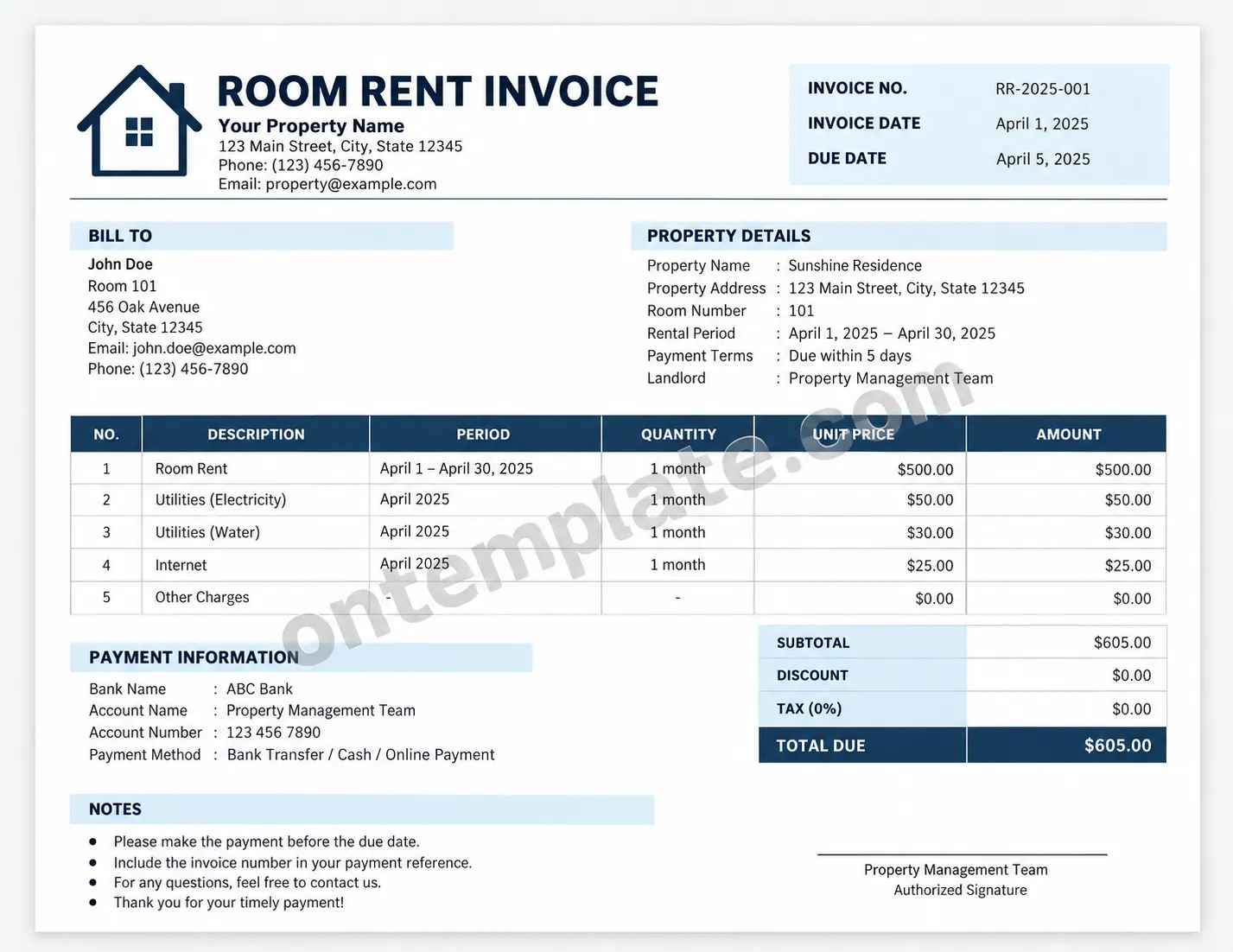
What Should a Room Rental Invoice Include?
A useful room rental invoice should contain enough information for the tenant to understand exactly what they are being charged. Keeping the structure simple is often better than adding unnecessary fields.
1. Landlord or Property Information
Start with the person or business issuing the invoice. Include the landlord’s or property manager’s name, property name if applicable, address, phone number, and email address.
This information makes it easy for the tenant to identify the invoice issuer and know where to send questions about the bill.
2. Tenant Information
The invoice should identify the person responsible for payment. Useful information may include the tenant’s name, room number, address, email address, and phone number.
For shared accommodation or properties with many rooms, the room number is particularly helpful because it immediately connects the invoice to the correct rental unit.
3. Invoice Number and Dates
Assigning a unique invoice number makes rental records easier to manage. A simple numbering system such as RR-001, RR-002, and RR-003 can work for a small property.
The invoice should also show the invoice date and payment due date. The rental period should be stated separately so the tenant can see which month or dates the charge covers.
4. Itemized Rental Charges
The main section of a room rent invoice is the list of charges. Rather than showing only one final amount, consider breaking the bill into individual items.
- Monthly room rent
- Electricity
- Water
- Internet
- Parking
- Cleaning services
- Maintenance charges
- Other agreed fees
Each item can include a description, billing period, quantity, unit price, and total amount. This makes the invoice more transparent and helps prevent confusion when the total includes several services.
5. Total Amount Due
The final amount should be clearly displayed. If applicable, show the subtotal, discounts, taxes, deposits, or other adjustments before displaying the total amount due.
Making the final figure visually prominent helps the tenant quickly identify how much needs to be paid.
6. Payment Information
Include practical payment instructions when appropriate. For example, you can provide the accepted payment method, bank information, payment platform, or other instructions specified in the rental agreement.
For security, only include payment information that is appropriate for the intended recipient and avoid unnecessary sensitive financial information.
How to Create a Room Rent Invoice
Creating a rental invoice does not have to be complicated. A consistent workflow can help you produce accurate invoices every billing period.
Step 1: Gather the Rental Information
Before preparing the invoice, collect the tenant name, room number, rental period, agreed monthly rent, and any additional charges. Check the rental agreement if you need to confirm fees or payment terms.
Step 2: Add the Invoice Details
Enter the invoice number, invoice date, and due date. Make sure the dates match the applicable rental period and payment agreement.
Step 3: List Each Charge
Enter room rent as the primary line item, followed by utilities or other charges that apply. Keeping each charge separate makes the calculation easier to review.
Step 4: Calculate the Total
Add the applicable charges and check the calculation before sending the invoice. If you apply a discount, deposit, credit, or other adjustment, make sure it is clearly identified.
Step 5: Review and Send
Check the tenant name, room number, rental period, amount, due date, and payment instructions. Once everything is correct, send the invoice through your normal communication or billing method and keep a copy for your records.
Tips for Making a Professional Room Rent Invoice
A professional invoice should prioritize clarity over decoration. The tenant should be able to understand the bill within a few seconds.
- Use clear headings: Separate tenant information, property details, charges, and payment instructions.
- Keep the layout consistent: Use the same structure for every billing period.
- Highlight the total: Make the final amount easy to locate.
- Use itemized charges: Avoid combining unrelated fees into one unexplained amount.
- Include a due date: Make the expected payment deadline obvious.
- Keep copies: Save completed invoices for future reference.
- Check calculations: Review totals before sending each invoice.
- Match the rental agreement: Only charge fees that are supported by the applicable rental terms.
Room Rent Invoice vs. Rent Receipt
A room rent invoice and a rent receipt serve different purposes. An invoice generally requests payment or records an amount that is due. A rent receipt usually confirms that a payment has already been received.
For example, a landlord may send a room rental invoice at the beginning of the month and provide a rent receipt after the tenant pays. Keeping both documents can create a clearer record of billing and payment history.
Digital and Printable Room Rent Invoices
A room rent invoice can be used in either digital or printable form. The best format depends on how the landlord and tenant manage their rental records.
A digital invoice is convenient for email, messaging platforms, cloud storage, and online record keeping. A printable invoice can be useful when physical documentation is preferred or when a signed paper record is needed.
Using a template that works well in both formats gives landlords greater flexibility. The same invoice design can be completed electronically, saved as a PDF, printed, or archived for future reference.
Common Mistakes to Avoid
Even a simple rental invoice can cause problems if important information is missing or inconsistent. Avoid these common mistakes:
- Leaving out the rental period.
- Using an unclear or incorrect due date.
- Failing to identify the room number.
- Combining utilities and rent without explaining the charges.
- Using inconsistent invoice numbers.
- Sending an invoice without checking the final calculation.
- Charging fees that are not supported by the applicable rental agreement.
A short review before sending the invoice can prevent many avoidable misunderstandings.
Who Can Use a Room Rent Invoice Template?
A room rent invoice template can be useful for a wide range of rental situations. Individual landlords can use it for one or several rooms, while property managers can adapt the same format for larger rental operations.
It may also be suitable for shared houses, boarding houses, student accommodation, co-living properties, guest rooms with recurring rental arrangements, and other room-based rental arrangements where regular billing records are useful.
Conclusion
A well-structured room rent invoice makes rental billing clearer, more organized, and easier to document. By including landlord and tenant details, room information, rental dates, itemized charges, payment terms, and a clearly displayed total, you can create an invoice that is practical for everyday use.
Using a reusable room rent invoice template can save time and help maintain consistency across billing periods. Whether you prefer a digital document or a printable invoice, a simple and professional format makes it easier for both landlords and tenants to understand their rental payment records.
