Change orders are especially important in construction because the original scope rarely survives every project exactly as planned. Clients may request additional finishes, design details may be clarified, site conditions may differ from expectations, or materials may become unavailable. A well-designed form turns those changes into a controlled administrative process rather than an ambiguous verbal instruction.
A useful template should therefore do more than provide a blank description box. It should connect the proposed change to the original contract, identify the affected work, show the financial calculation, explain schedule consequences, identify supporting documents, and provide an appropriate approval record. AIA guidance similarly emphasizes documenting the change in work together with adjustments to contract sum and contract time. :contentReference[oaicite:0]{index=0}
This guide explains what a client-facing change order should contain, how to create one, how to choose between PDF, Word, and spreadsheet formats, how to calculate the financial impact, and how to establish a repeatable approval workflow. It also includes practical examples and reference visuals so you can design a process that is clear for both clients and project teams.
What Is a Change Order Template for Clients?
A change order is a written document used to modify an existing project agreement after the original scope has been established. The modification may add work, remove work, substitute materials, revise specifications, change timing, alter quantities, or otherwise affect the agreed project terms. The exact legal effect depends on the governing contract and applicable law.
A client-oriented template makes this process easier by separating the change into understandable sections. A client should be able to read the form and determine what was originally included, what is now proposed, what the change will cost, whether the completion date will move, and what decision is being requested.
The strongest templates also create a connection between the change and the documents that support it. These might include revised drawings, specifications, photographs, meeting notes, requests for information, supplier quotations, subcontractor pricing, schedules, or other project records. This makes the change easier to review later.
For example, if a homeowner asks a contractor to replace a standard countertop with a premium material, the change order should not simply say “upgrade countertop.” It should identify the original material, the proposed replacement, the affected quantity or area, the additional material and installation cost, any schedule impact, and the approval required.
The template is therefore best understood as a decision record rather than merely a form. It creates a common reference point for the client and project team and helps prevent different people from remembering the same conversation differently.
Why Clients Need a Structured Change Order
Clients benefit from change orders because project modifications can affect more than the visible scope. An apparently small request can create additional procurement, labor, engineering, coordination, inspection, sequencing, or schedule consequences. A structured form makes those effects visible before the change is treated as part of the work.
For contractors, documentation provides a clear record of what was requested and what was priced. For clients, it provides an opportunity to understand the financial and scheduling consequences before approving the work. For project managers, it creates a consistent workflow for reviewing and tracking multiple changes.
Change orders can arise from owner requests, unforeseen conditions, errors or omissions in documents, design development, material substitutions, weather-related effects, equipment problems, or other project circumstances. Industry guidance identifies these kinds of conditions as common drivers of construction changes. :contentReference[oaicite:1]{index=1}
A consistent process also reduces the likelihood that an informal instruction becomes disputed later. A verbal “please add this” can leave uncertainty about price, schedule, inclusions, exclusions, and authorization. A written change order forces those questions into the open before the work is treated as approved.
The goal is not to make every change bureaucratic. A good form should make simple changes easier by standardizing the information that must be captured. The result is a shorter conversation, clearer approval, and a better project record.
Core Components of a Client Change Order
1. Project and Contract Identification
Start with the project name, project address or work location, contract number, original contract date, change order number, and date of the proposed change. These identifiers prevent the form from becoming disconnected from the underlying agreement.
The change order number should normally follow a consistent sequence, such as CO-001, CO-002, and CO-003. Sequential numbering makes it easier to reconcile approved changes with accounting records, project schedules, meeting minutes, and correspondence.
Include the client or owner name and the contractor or service provider name. Where the project involves an architect, engineer, construction manager, or other approving participant, provide appropriate identification fields without assuming that every project has the same parties.
It is also useful to identify the person who requested the change. The requester might be the client, contractor, designer, consultant, or another authorized participant. Recording this information helps explain the origin of the change.
Do not overload the header with information that has no practical purpose. The objective is to make the project and contract immediately identifiable without turning the first page into a data-entry exercise.
2. Description of the Change
The description should explain the proposed modification in enough detail that someone who was not present during the discussion can understand it. Avoid descriptions such as “add room,” “change finish,” or “revise electrical.” Those phrases may be obvious to the people involved today but become ambiguous months later.
A better description states what is being added, deleted, substituted, relocated, or otherwise modified. Where possible, identify the location, quantity, specification, drawing reference, or other objective information that defines the change.
For example, instead of “add lighting,” a stronger description might state that six recessed fixtures are being added to a specified room, including wiring, switching, trim, testing, and coordination with the ceiling layout. The exact wording will vary by project, but the principle is consistent: define the work clearly.
Separate the description of the change from the reason for the change. The description answers “what is changing?” while the reason answers “why is it changing?” Keeping those questions separate makes later review much easier.
When the change depends on another document, reference it directly. A drawing revision, specification section, RFI, client instruction, or meeting record can provide additional context without forcing the change order itself to reproduce every technical detail.
3. Reason for the Change
The reason section should explain the event or decision that caused the modification. Common categories include client request, design clarification, unforeseen condition, material availability, code-related adjustment, coordination issue, correction, substitution, or schedule requirement.
Using a reason category can make reporting easier, but the category should not replace an actual explanation. “Client request” tells you who initiated the change but not what decision led to it.
A useful explanation might state that the client requested a different tile after reviewing physical samples, or that an existing concealed condition required a different installation method. The purpose is to establish context without turning the form into a lengthy narrative.
For disputed changes, the reason can become particularly important because it helps distinguish new client-requested work from work that may already have been included in the original contract. The original agreement and its incorporated documents should therefore remain the primary reference point.
Where responsibility or entitlement is uncertain, avoid presenting a template as a legal determination. A form can record the facts and the parties’ stated positions, but contract interpretation may require professional legal or contractual review.
Documenting Cost Changes Clearly
One of the most important functions of a change order is to show the financial effect of the modification. A client should not have to reconstruct the price from scattered estimates, emails, invoices, or handwritten notes.
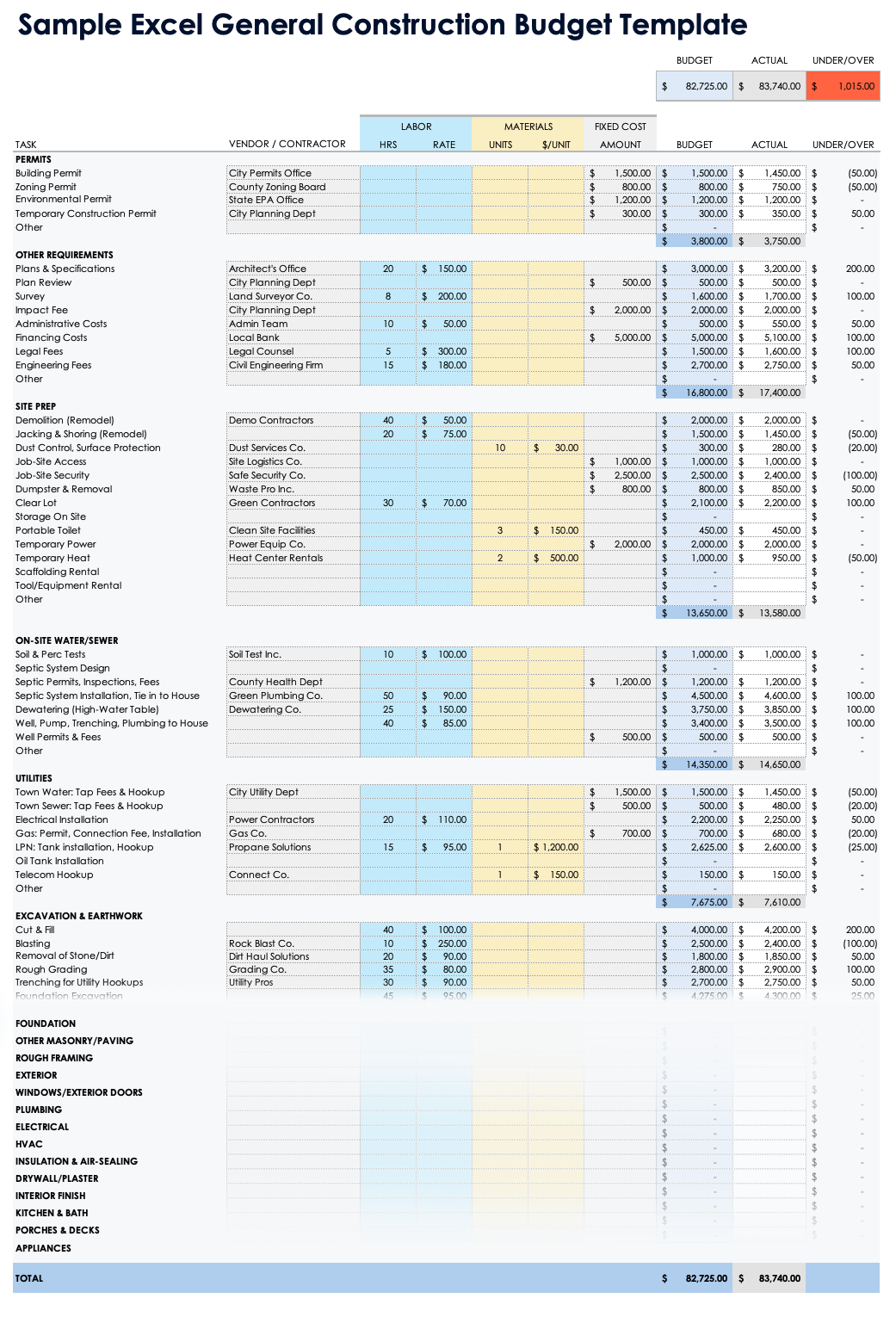
A basic cost section should identify the original contract amount, the net value of previously approved changes, the value of the current change, and the resulting revised contract amount. This creates a visible audit trail from the original baseline to the new total.
For itemized changes, show quantities, units, unit prices, labor, materials, equipment, subcontractor costs, and applicable markup where appropriate. The level of detail should match the complexity and pricing method of the project.
Negative amounts should be clearly identified when work is being deleted or credited. A deductive change should not look visually identical to an additional charge. Consistent signs, labels, and subtotals reduce calculation mistakes.
For example, a hypothetical change might add $2,400 of materials and $1,600 of labor while removing $500 of previously specified work. The net direct change would be $3,500 before any contractually applicable overhead, profit, tax, or other adjustment. The example is illustrative rather than a universal pricing rule.
Spreadsheets are especially useful for this part of the process because formulas can calculate subtotals and revised contract values. However, the final client-facing document should still be easy to read and should not expose unnecessary internal calculations.

Schedule Impact and Completion Dates
Cost is only one side of a project change. A modification may also require additional procurement time, redesign, fabrication, inspections, coordination, or installation time. A client-facing form should therefore have a dedicated schedule section rather than leaving timing buried in the description.
At minimum, record whether the change affects the contract duration. If it does, state the number of added or removed days according to the project’s governing method of measuring time. Then identify the revised completion or substantial completion date where applicable.
Do not automatically assume that every price change creates a schedule change. Some modifications may be completed within existing float or may replace work that would have occurred anyway. The form should capture the actual assessed impact.
Schedule effects should also consider dependencies. A client request for a different product may appear simple, but if the product has a longer lead time, the change could affect downstream installation activities. The schedule section gives the project team a place to make that consequence explicit.
For a hypothetical example, a client may approve an additional built-in feature that requires three extra working days and shifts a dependent finish activity. The change order should state both the added work and the resulting schedule adjustment instead of simply saying “project delayed.”

Supporting Documents and References
Supporting documents are essential when a change cannot be understood fully from the form alone. Drawings, specifications, photographs, quotations, meeting minutes, RFIs, product information, and cost breakdowns can establish the basis for the requested modification.
A change order should identify its supporting documents by title, number, revision, and date whenever those identifiers exist. This is especially useful when drawings or specifications have multiple revisions.
Document control matters because construction information changes frequently. A change order referring to “the latest drawing” is less useful than one identifying a drawing number and revision. The latter creates a specific reference that another person can locate.
Supporting documentation should also be proportionate. A small no-cost substitution may require only a revised product reference, while a major structural change could require drawings, calculations, pricing, schedule analysis, and professional review.
Industry document-control guidance commonly treats change orders, RFIs, submittals, drawings, correspondence, and other project records as items that should be tracked systematically. :contentReference[oaicite:2]{index=2}
Approval and Signature Requirements
A change order should identify who is authorized to approve the modification. The appropriate signatories depend on the contract, project structure, jurisdiction, and type of change.
Do not assume that every project requires the same signature combination. Some arrangements involve only an owner and contractor, while others include an architect, construction manager, engineer, funder, or other party. The governing agreement should determine the approval structure.
Signatures should normally be accompanied by printed names, titles where relevant, and dates. Electronic signatures may be appropriate when permitted by the contract and applicable law, but the chosen method should preserve a reliable record of who approved the change and when.
The approval block should also distinguish recommendation from approval. An engineer may recommend a change without being the party that has authority to alter the contract price. Similarly, a project manager may coordinate the review without being the contractual decision maker.
AIA materials emphasize that a completed change order represents agreement on the applicable change, including relevant contract-sum and contract-time adjustments. :contentReference[oaicite:3]{index=3}

Different Types of Client Change Orders
A fixed-sum change order establishes a defined price for a defined modification. It is useful when the scope can be priced with reasonable certainty before the work begins.
A time-and-materials change order is useful when the final quantity or effort cannot be established reliably in advance. The document should identify the applicable labor rates, material pricing method, equipment rates, markup rules, and documentation requirements.
A zero-cost change order records a modification that does not alter the contract value. It can still be important because a material, method, specification, or sequencing change may need formal documentation even when the price remains unchanged.
A unit-price change order establishes a price per measurable unit when the final quantity is uncertain. Examples might include additional excavation per cubic unit, additional surface preparation per square unit, or other measurable work categories.
The selected pricing method should match the original contract and the nature of the change. Industry template collections commonly distinguish fixed-sum, time-and-materials, zero-cost, and unitary-cost approaches. :contentReference[oaicite:4]{index=4}

Choosing the Right File Format
PDF for Client Approval
PDF is often the strongest format for the final approved document because it preserves the visual structure of the form and is easy to distribute. It can be particularly useful when the change order needs to be signed and stored as a fixed record.
A fillable PDF can provide a practical middle ground between a blank printable form and a fully automated workflow. Users can enter project information, descriptions, costs, and dates without changing the basic structure.
For client communication, a PDF also reduces the likelihood that someone unintentionally changes formulas, labels, or formatting after approval. The editable source can remain separate from the final approved record.
However, a PDF should not be treated as proof that the underlying change is legally valid. The contract, authorization process, and applicable law remain important.
When preparing a PDF version, make sure fields are large enough for meaningful descriptions, totals are visually prominent, and signatures are clearly associated with the parties who are expected to approve the change.

Word for Editable Documents
Word is useful when the change order needs flexible narrative content. A contractor can adjust headings, add project-specific clauses, modify tables, or prepare a customized client version without rebuilding the entire document.
A Word file is especially convenient when a business maintains a master template and creates a separate document for each project. It can also be useful for smaller teams that do not need complex spreadsheet formulas.
The main weakness is version control. Multiple people may save modified copies of the same document, making it harder to determine which version was actually approved.
For that reason, a strong Word workflow should use clear file naming, change order numbers, revision dates, and a controlled storage location. Once approved, the final version can be converted to a fixed format for recordkeeping.
The content should remain consistent regardless of file format. Moving from Word to PDF should change the presentation, not the underlying information required to approve the change.
Excel for Cost Calculation
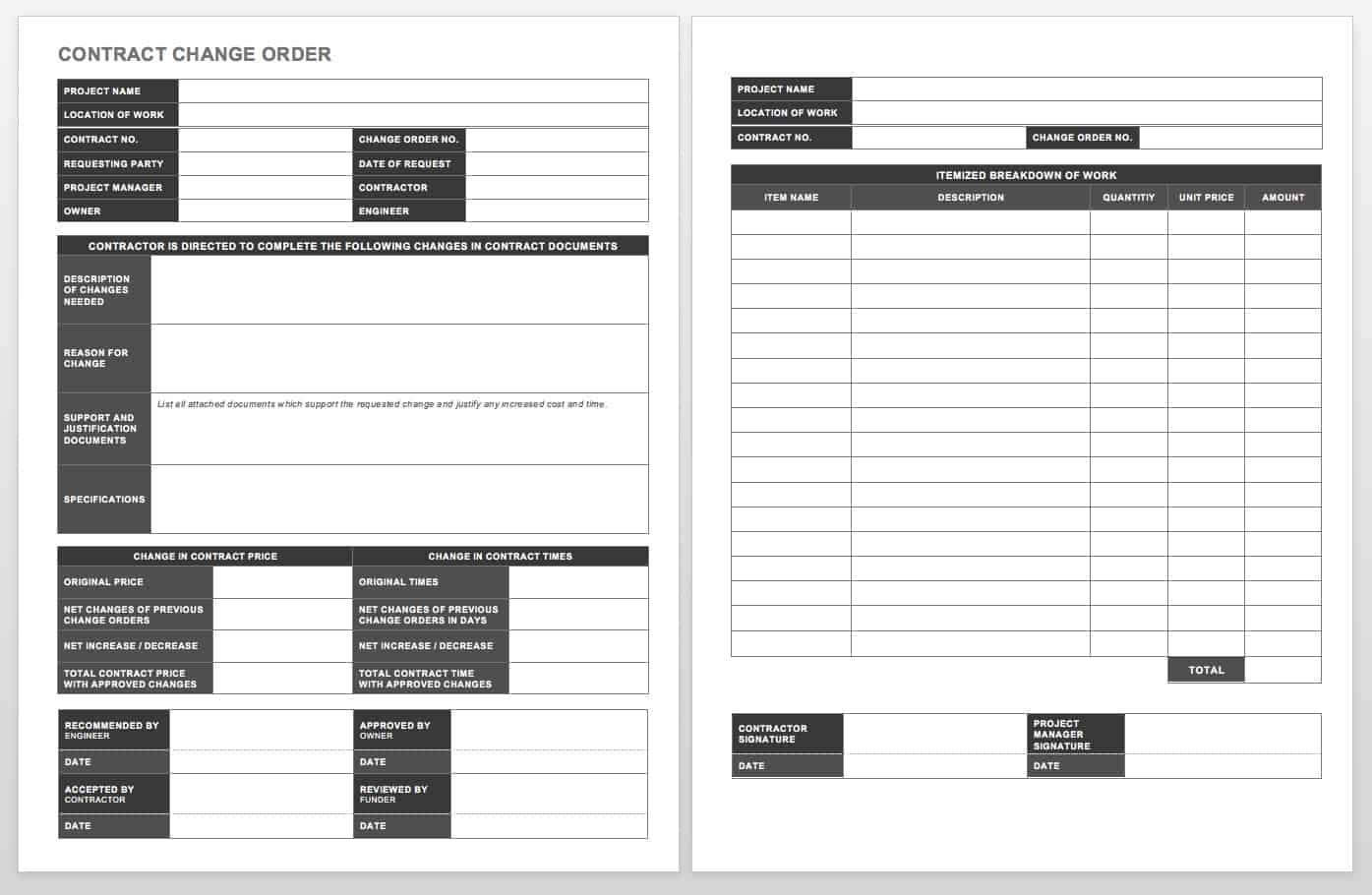
Excel is particularly effective when the change requires detailed calculations. It can separate labor, materials, equipment, subcontractor costs, overhead, markup, taxes, credits, and other pricing components.
Formula-driven calculations reduce arithmetic errors, but formulas should be reviewed carefully. A spreadsheet can produce a precise-looking answer even when the wrong quantity, rate, or cell reference was entered.
A practical workbook may use separate sheets for the client-facing change order, detailed estimate, assumptions, supporting quotations, and change-order log. The final approved document can then be exported to PDF.
Use locked formulas and clearly marked input cells where appropriate. Avoid hidden calculations that another team member cannot understand or audit.
For small changes, an elaborate workbook may be unnecessary. The best format is the one that captures the required information accurately without creating more administrative effort than the change warrants.
How to Create a Change Order Template for Clients
Begin by reviewing the original contract and identifying how changes are supposed to be requested, priced, approved, and recorded. This is more reliable than starting with a generic form and assuming it automatically satisfies the contract.
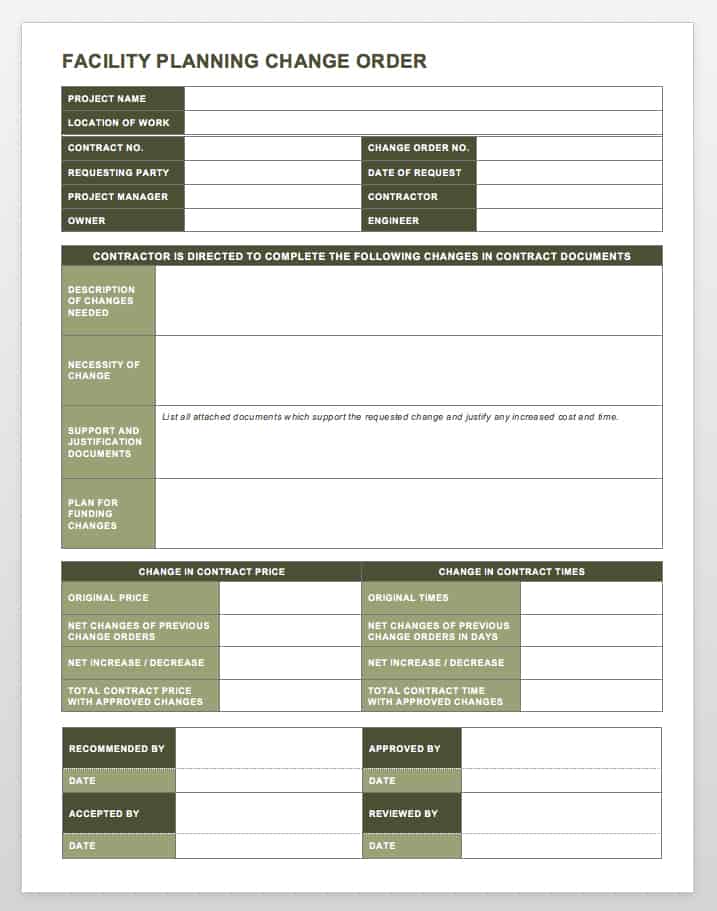
Next, define the information that every change must contain. At a minimum, this normally includes project identification, change description, reason, pricing impact, schedule impact, supporting documentation, and approval information.
Then decide how detailed the cost section needs to be. A residential service company may need a compact labor-and-material table, while a commercial construction project may require detailed subcontractor, equipment, unit-price, and markup calculations.
After that, establish a numbering system and document-control convention. For example, each change can receive a unique number, while attachments use the same number as a reference. The exact naming convention should be consistent across the organization.
Finally, create the client-facing layout. Put the information a client needs to make a decision near the beginning, while supporting calculations and detailed backup can appear later or in attachments.

Step-by-Step Change Order Workflow
Step 1: Identify the Change
Record the event that triggered the proposed modification. Capture the date, requester, affected area, and relevant communication or document reference.
Do not immediately treat every request as an approved change. First determine whether the original contract already includes the requested work.
Review drawings, specifications, exclusions, allowances, schedules, and previous change orders where relevant. This helps distinguish genuinely additional work from clarification of existing obligations.
If the status is unclear, label the document as a request or proposal rather than representing it as an approved change order.
This distinction is important because a request starts a review process, while an approved change modifies the agreed project position.

Step 2: Define the Scope
Write the proposed change in concrete terms. Identify what is added, deleted, replaced, relocated, accelerated, or otherwise modified.
Include quantities where they are known. For example, a flooring change could identify the affected area, original finish, replacement finish, installation method, and associated transition details.
List exclusions when they are important to preventing misunderstanding. If a client-approved upgrade does not include painting, electrical modifications, or structural work, say so.
Reference drawings or specifications rather than relying entirely on prose when technical details are involved.
The scope should be understandable to a reviewer who did not participate in the original discussion. That standard is useful because project personnel change over time.

Step 3: Calculate the Financial Impact
Break the change into its major cost components. Depending on the project, these may include labor, materials, equipment, subcontractors, design services, permits, testing, delivery, disposal, and other direct costs.
Apply the pricing rules established by the contract. If overhead, profit, tax, or markup applies, make the calculation visible enough to review.
For a client-facing document, present the final change value prominently. Detailed backup can be attached or maintained in a supporting estimate.
Check that the revised contract amount reconciles mathematically with the original amount and all previously approved changes.
A useful quality-control test is to calculate the revised total independently before issuing the form. This simple second check can catch spreadsheet or transcription errors.

Step 4: Assess Schedule and Risk
Determine whether the change affects procurement, labor sequencing, inspections, design coordination, or completion.
Identify the number of additional or reduced days where the contract requires a quantified schedule adjustment.
Consider whether the change creates secondary effects. A revised door size, for example, might affect framing, finishes, hardware, procurement, and inspection.
Where risk is material, record the assumption or dependency instead of hiding it inside a general notes field.
A clear risk description helps the client understand why a seemingly simple request may have consequences beyond the immediate item being changed.

Step 5: Review Supporting Information
Attach the documents necessary to demonstrate the basis of the change. The review package should be proportional to the size and complexity of the modification.
For a simple finish selection, a product quotation or specification may be sufficient. For a major design modification, the package may need drawings, engineering information, cost breakdowns, schedule analysis, and other evidence.
Make sure attachment names and revisions are clear. Avoid sending several files with generic names such as “drawing final.pdf” or “quote new.xlsx.”
Where possible, use a stable project document repository rather than relying on individual email inboxes as the permanent record.
Document control becomes increasingly important as the number of changes grows. A project with dozens of modifications needs a searchable history that connects each change to its supporting information.
Step 6: Obtain Approval Before Proceeding When Required
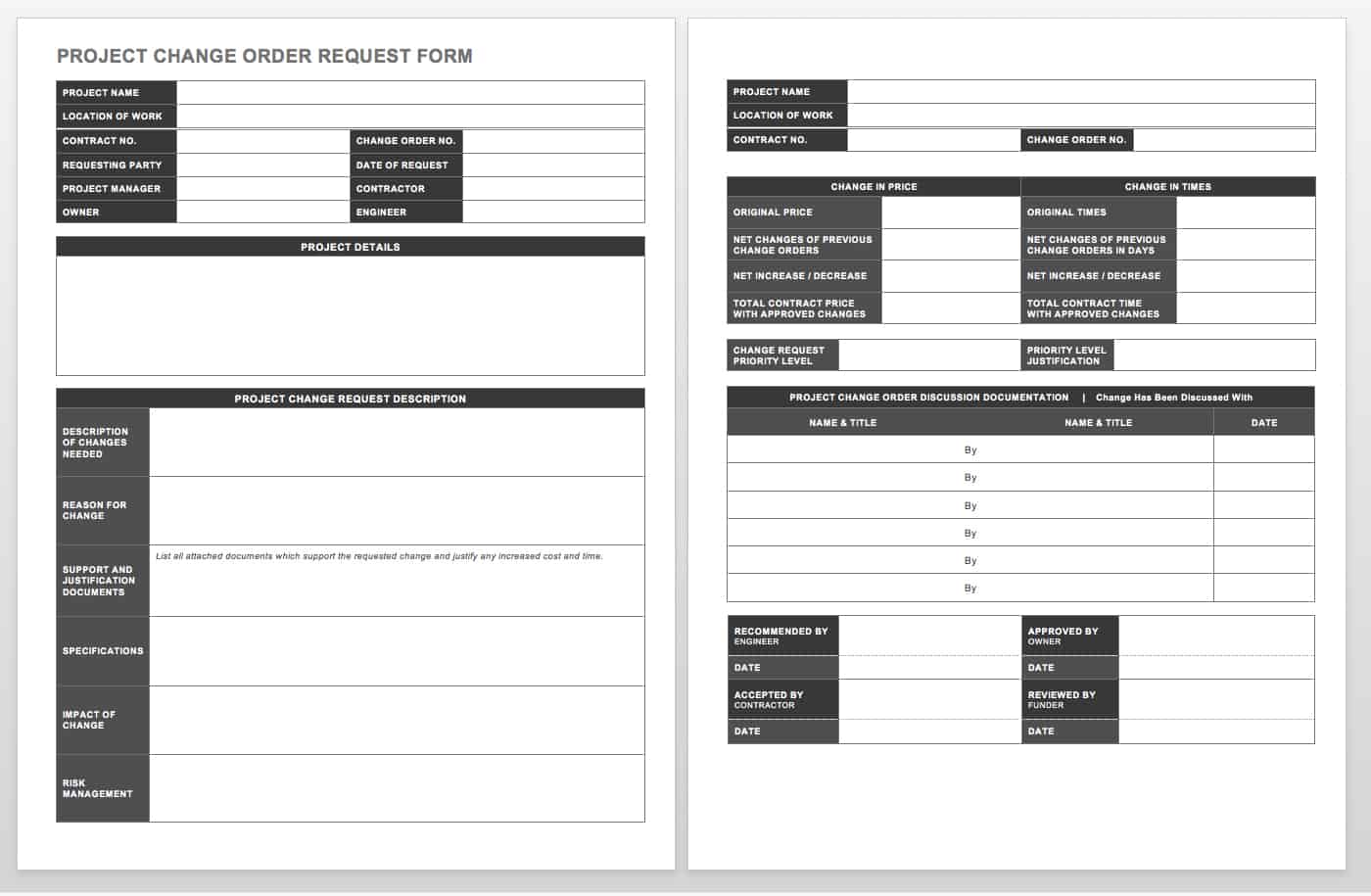
Once the scope, price, schedule, and supporting information have been reviewed, route the change to the appropriate decision makers.
Do not assume that the person who requested the work is automatically authorized to approve a price change. The project contract and internal authorization rules should control.
If the parties agree, obtain the required signatures or other formal approval method and preserve the completed record.
If the request is rejected or modified, retain the decision record where appropriate. A rejected change can still provide useful project history if the issue resurfaces later.
When urgent work must proceed before final paperwork, follow the specific notice and authorization provisions in the governing contract rather than relying on an informal “we will document it later” approach.
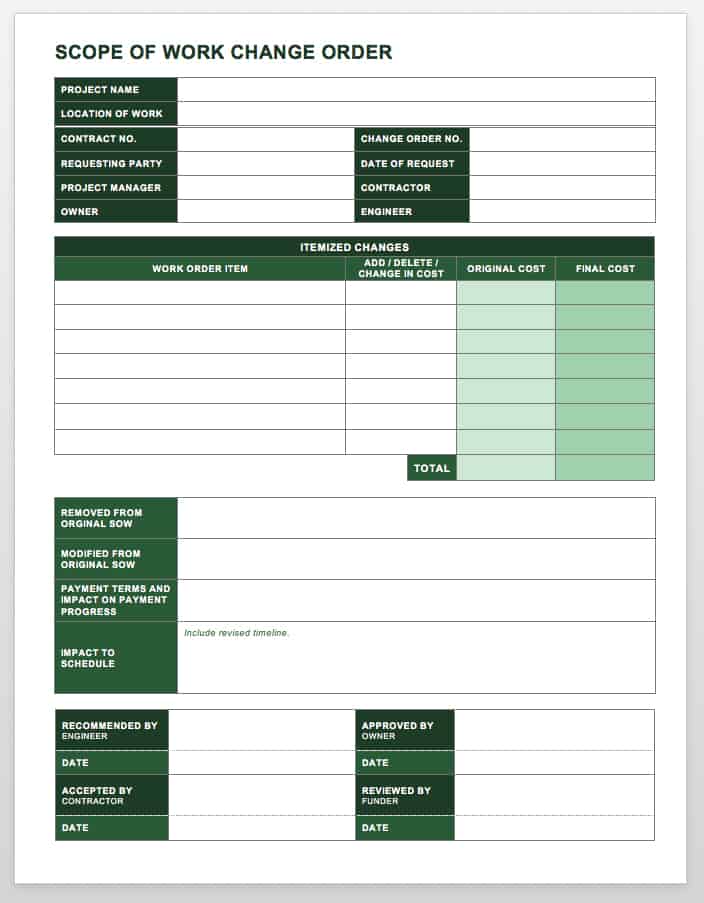
Practical Examples
Example 1: Client Requests an Upgrade
Imagine a residential renovation where the original contract includes a standard bathroom tile. During construction, the client selects a premium tile with a higher purchase price and more complex installation requirements.
The change order should identify the original tile, the selected replacement, the affected area, the price difference, any additional installation labor, and any change in procurement time.
If the premium tile requires an additional week for delivery, that consequence should be shown separately from the cost adjustment.
The client can then evaluate the decision based on both price and timing rather than seeing only an additional dollar amount.
This example demonstrates why a client change order should combine scope, cost, and schedule rather than treating the document as a simple invoice.

Example 2: Unforeseen Site Condition
Suppose excavation reveals a site condition that was not apparent from the information available when the original work was priced. Additional labor, equipment, or disposal may become necessary.
The change documentation should describe the observed condition, identify the affected work, and reference photographs, field reports, drawings, or other evidence where appropriate.
The cost section should show how the additional amount was calculated and whether any existing allowance or contract provision affects the calculation.
The schedule section should state whether the condition affects the completion date or whether the additional work can be absorbed into existing activities.
The purpose is not to decide responsibility through the template. It is to establish a factual record that allows the parties to apply the contract correctly.

Example 3: Scope Reduction
Not every change increases the contract price. A client may decide to remove a group of cabinets, omit a decorative feature, or substitute a less expensive finish.
The change order should clearly identify the deleted work and the associated credit. If replacement work is added elsewhere, the additions and deductions should be shown separately.
Separating additions from deductions makes the net effect easier to audit. It also helps prevent a credit from being accidentally omitted when the project team focuses only on new work.
The revised contract amount should reflect the approved net adjustment according to the contract’s pricing rules.
Scope reductions should also be checked for secondary consequences, such as changes to procurement, sequencing, warranties, or minimum order quantities.
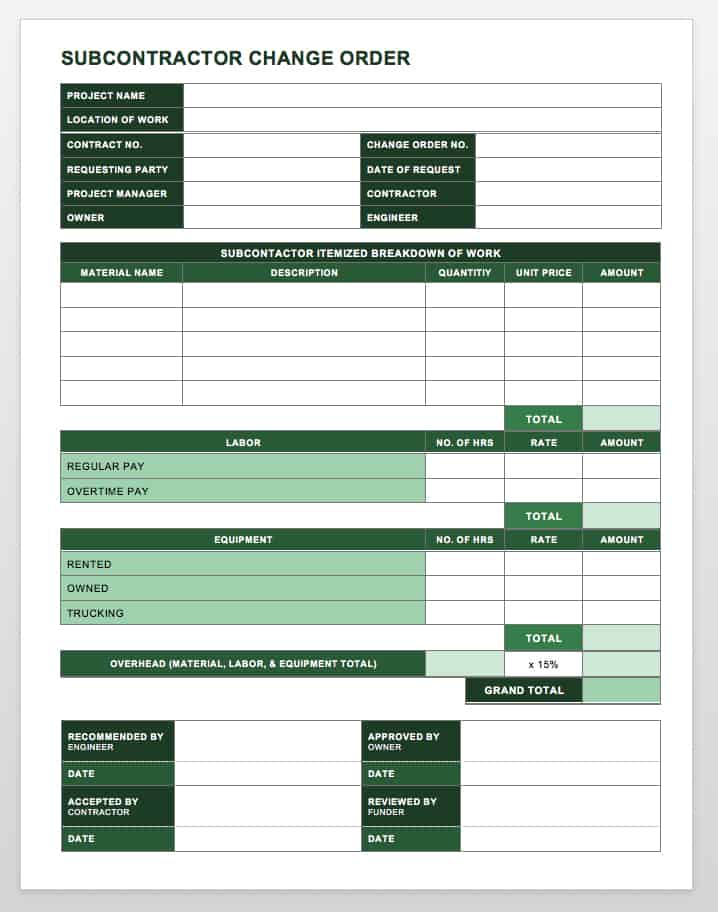
Common Mistakes to Avoid
One of the most common mistakes is documenting a change only after the work has already been completed. Late documentation can make it harder to verify the original instruction, agreed price, or actual schedule effect.
Another problem is vague scope language. “Extra work as discussed” may seem convenient, but it creates ambiguity. The change order should state what the parties actually agreed to change.
Leaving the schedule section blank is another avoidable problem. If there is no schedule impact, explicitly state that the change has no approved schedule adjustment rather than leaving the field empty.
Another mistake is failing to reconcile previous change orders. A revised contract total should account for the original amount, approved prior changes, and the current modification according to the project’s accounting method.
Finally, avoid using a generic template as though it were automatically compliant with every contract or jurisdiction. A template is an administrative tool, not a substitute for reviewing the governing agreement.
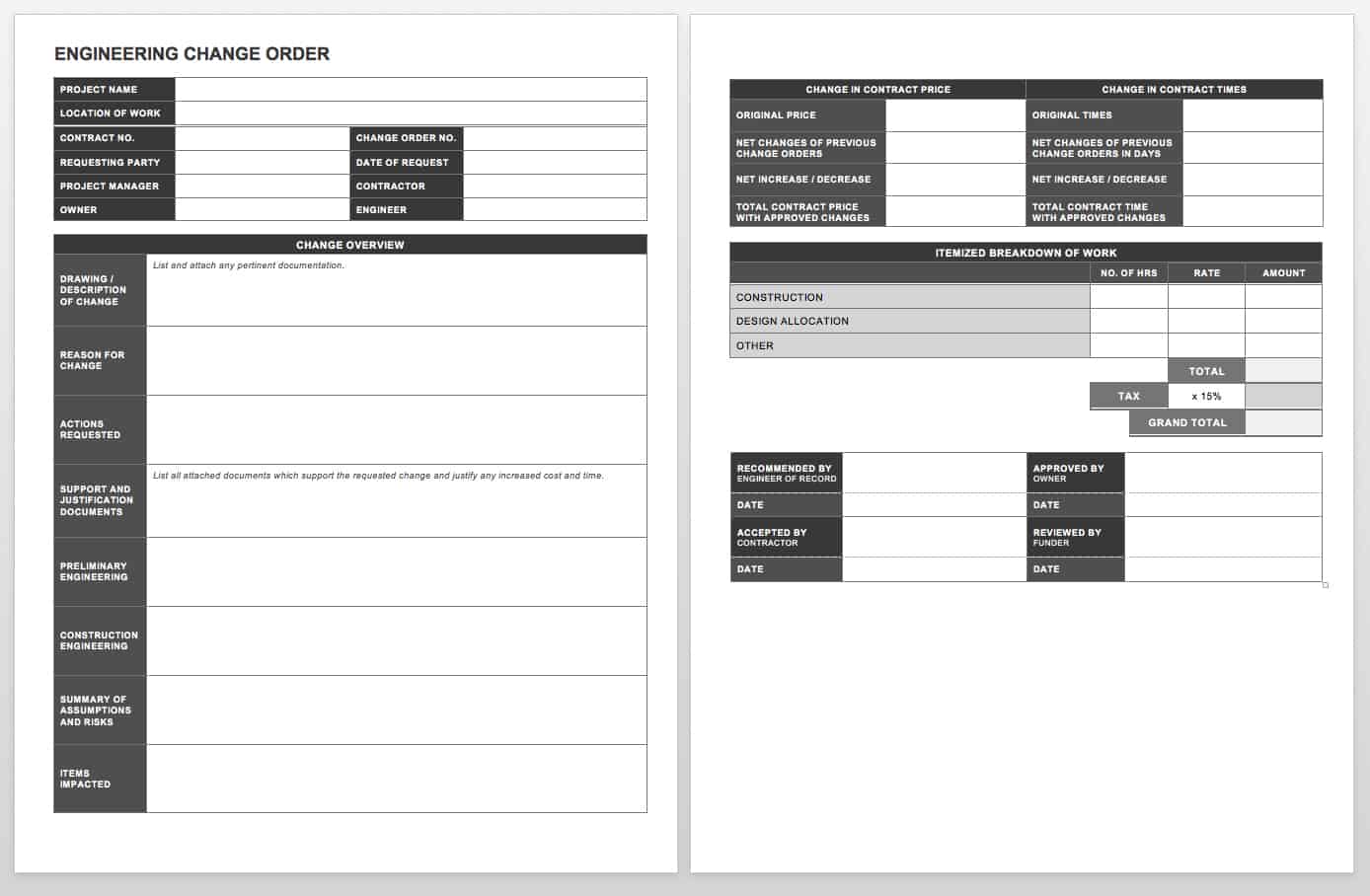
Best Practices for Client-Friendly Change Orders
Use plain language whenever possible. Technical details should remain accurate, but the client-facing summary should be understandable without requiring the reader to interpret construction jargon.
Put the decision information where it is easy to find. A client should quickly see the change description, price adjustment, schedule adjustment, and approval status.
Keep detailed calculations available without overwhelming the primary form. A concise summary supported by an itemized estimate is usually easier to review than a single document containing every internal calculation.
Use consistent terminology throughout the project. If the organization calls the document a change order, do not alternate randomly among change order, variation, amendment, extra work order, and change request unless those terms have distinct meanings in the project.
Maintain a central change-order log. The log can track number, date, description, requester, status, value, schedule effect, approval date, and final disposition. This gives project managers a portfolio-level view of pending and approved changes.

Practical Solution
The most practical approach is to build one master change order process and then create versions for the formats your team actually uses. Start with the required information rather than starting with a particular software package.
First, define the mandatory fields: project identifiers, change number, requester, scope, reason, supporting documents, price impact, schedule impact, and approval. Then define optional fields for risk, priority, funding, tax, markup, or specialized technical review.
Second, create an editable master version. Word is useful for narrative flexibility, while Excel is useful when calculations are complex. Keep the master controlled so that unauthorized changes to the template do not spread through active projects.
Third, create a client-facing PDF output. The PDF should show the approved scope, commercial adjustment, schedule adjustment, attachments, and signatures without exposing unnecessary internal calculations.
Fourth, maintain a change-order log that summarizes every request. This log should distinguish pending, approved, rejected, superseded, and completed changes so the team knows which modifications are actually part of the current project baseline.
Fifth, establish a review sequence. A practical sequence is request identification, contract review, scope definition, cost calculation, schedule assessment, supporting-document review, client or authorized-party approval, document execution, distribution, and log update.
Sixth, train the people who create and approve changes. The process will fail if field staff believe that a verbal instruction automatically authorizes additional work or if administrators cannot tell the difference between a proposal and an approved change.
Seventh, review the process periodically. If the same field is repeatedly misunderstood, redesign it. If cost calculations frequently require manual correction, improve the spreadsheet. If clients routinely ask the same question, add clearer language to the form.
This approach keeps the template practical. The goal is not to create the longest possible document, but to create a reliable record that makes the scope, money, time, and approval status unmistakable.
Reference Examples
The following reference examples illustrate different layouts and document structures that can inform the design of a client-facing change order. They are visual examples rather than universal legal or contractual requirements.
change order template for clients pdf
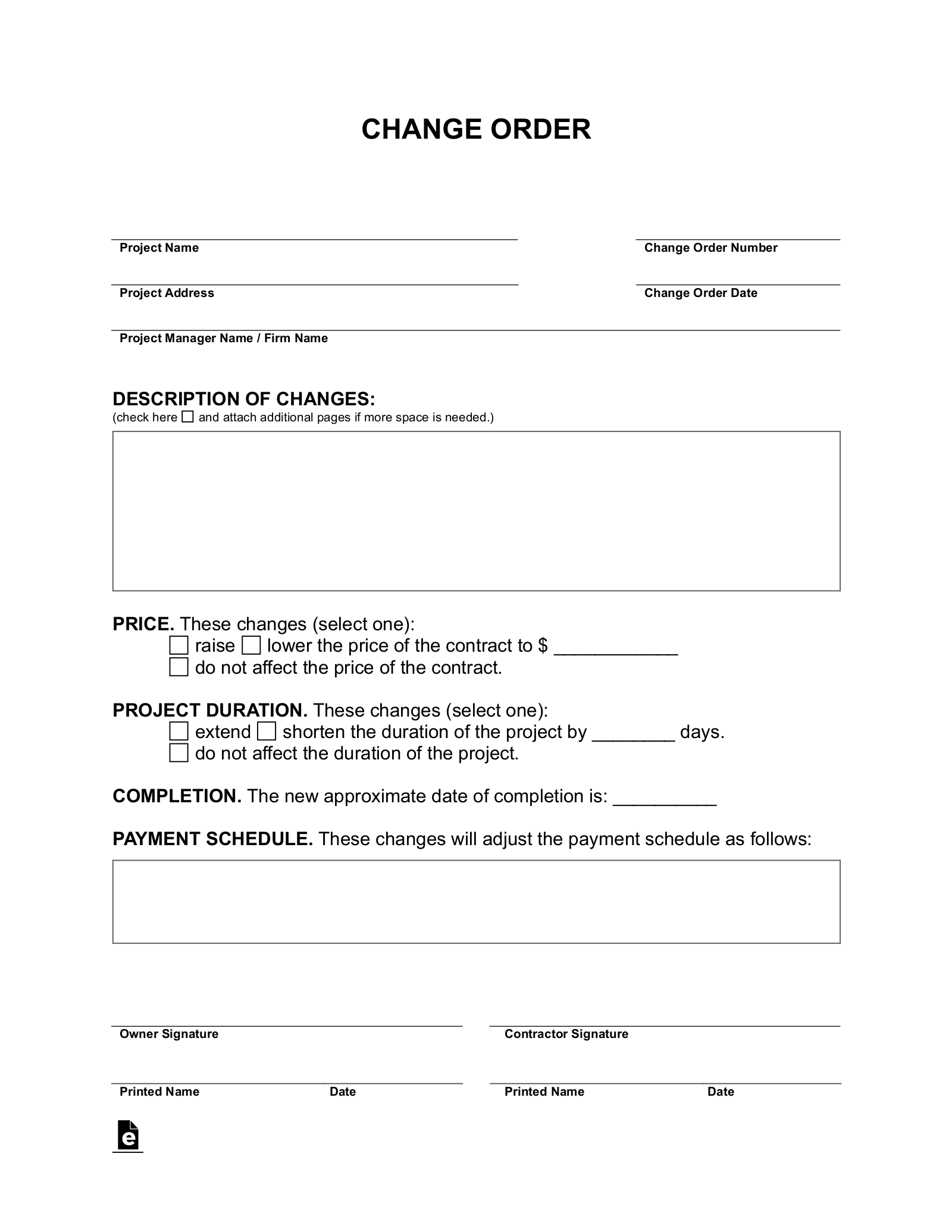
Source: eForms
change order template for clients free download
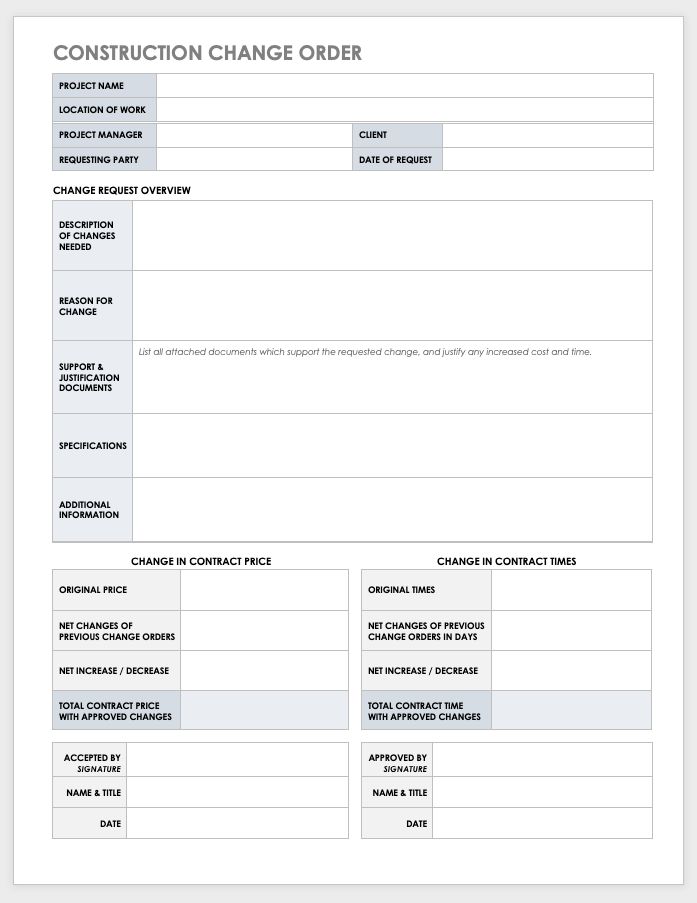
Source: Smartsheet
change order template for clients free
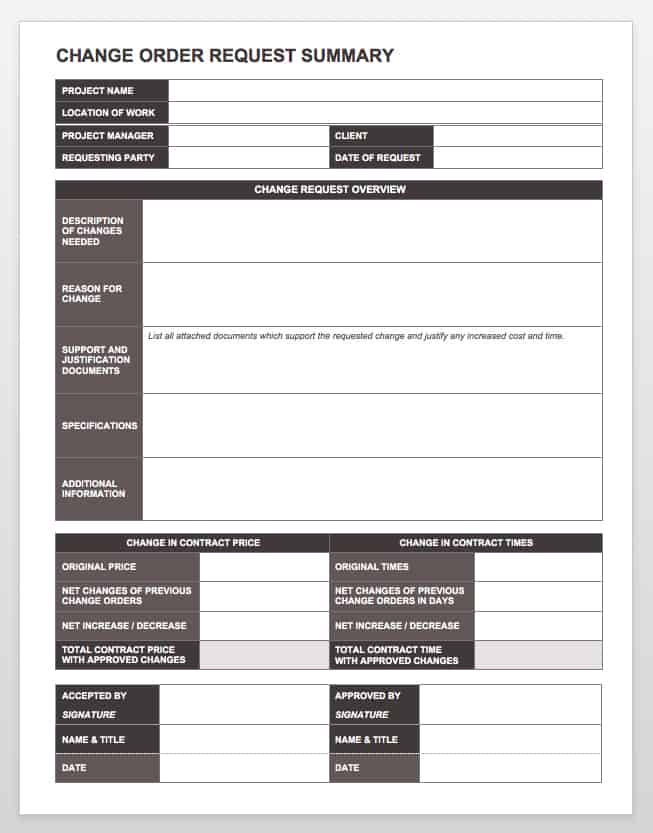
Source: Smartsheet
change order template for clients excel
Source: Smartsheet
change order template for clients template
Source: Smartsheet
change order template for clients word
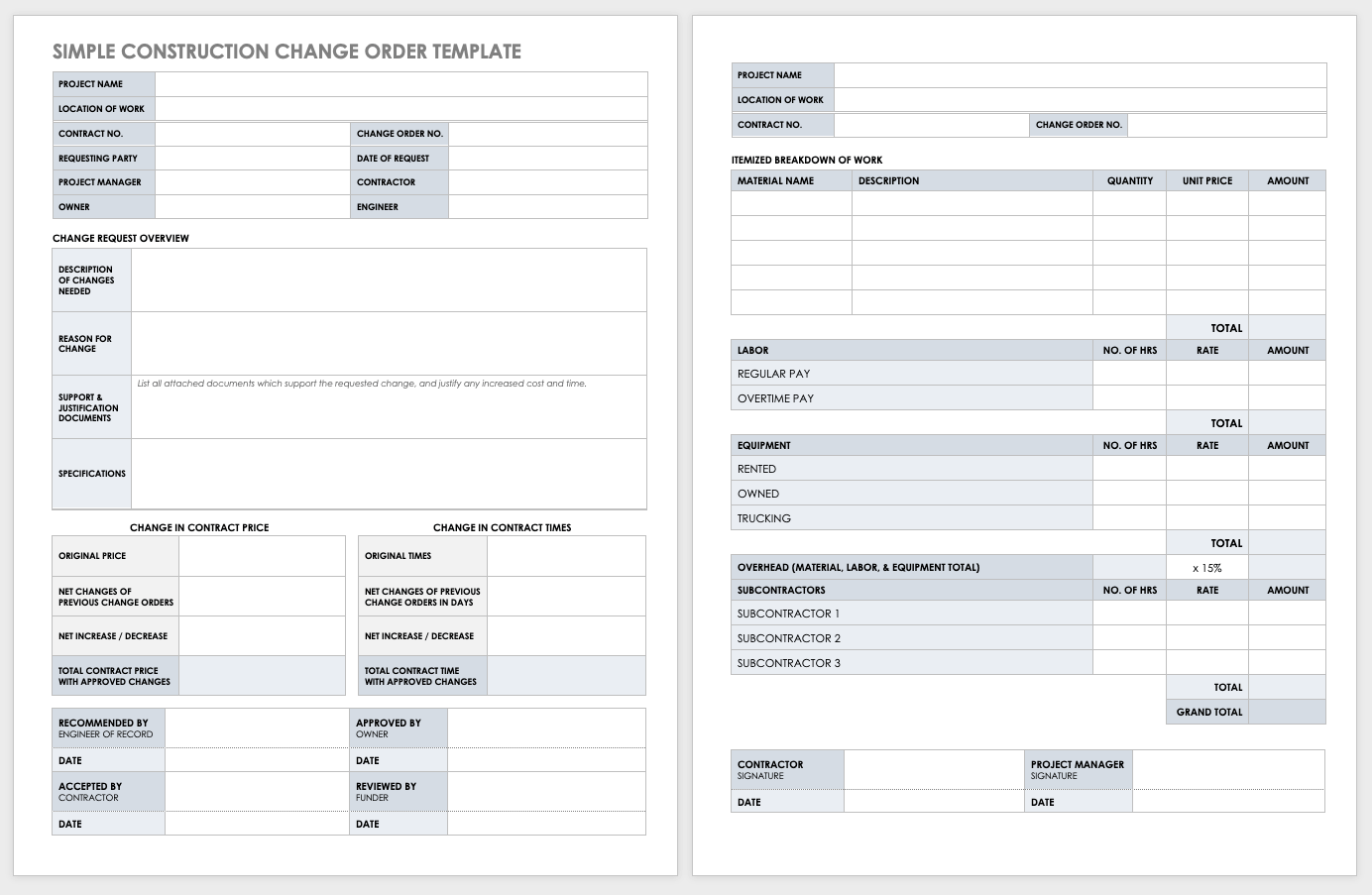
Source: Smartsheet
change of order template
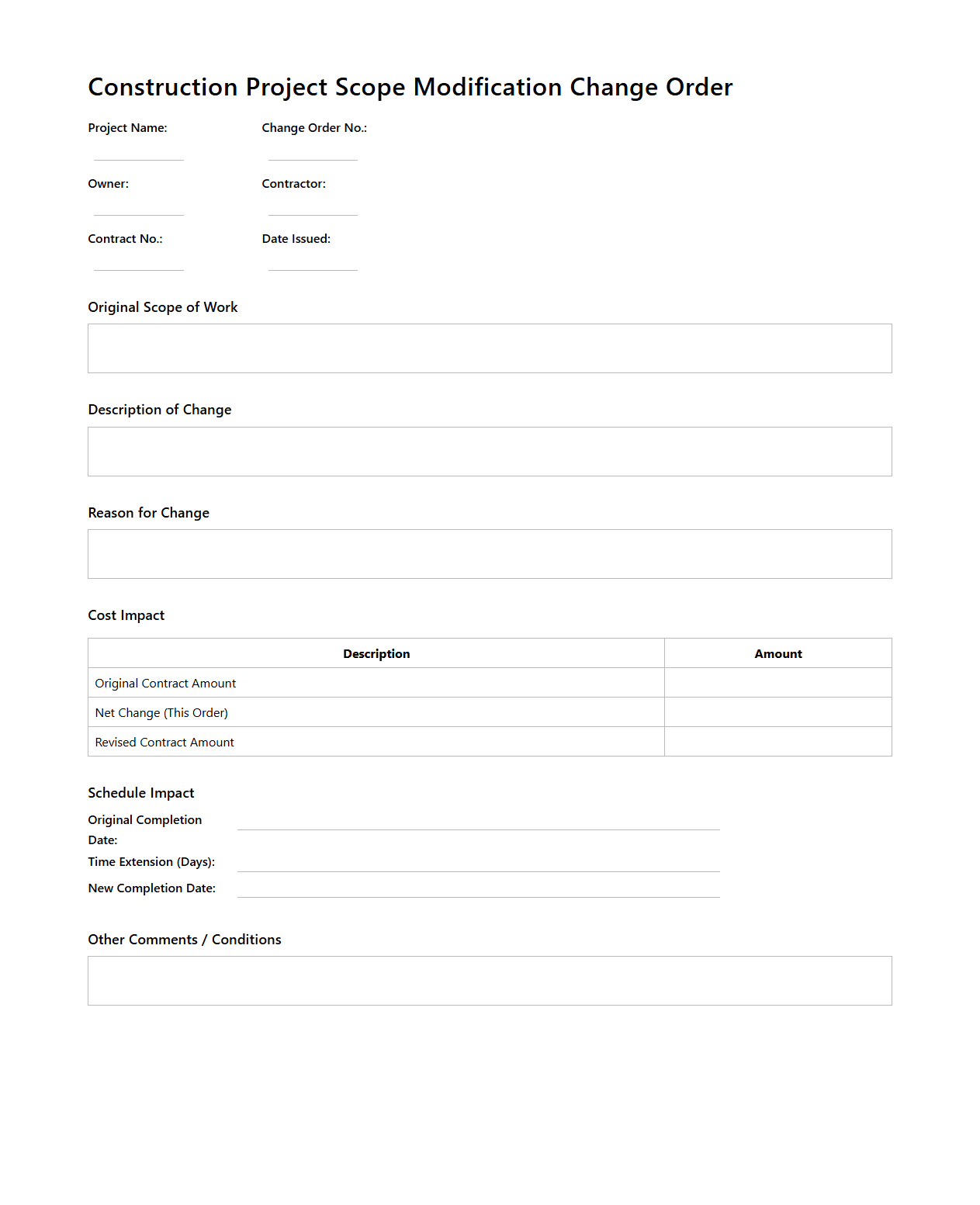
Source: Documentof
change order template free
Source: Smartsheet
change order template simple
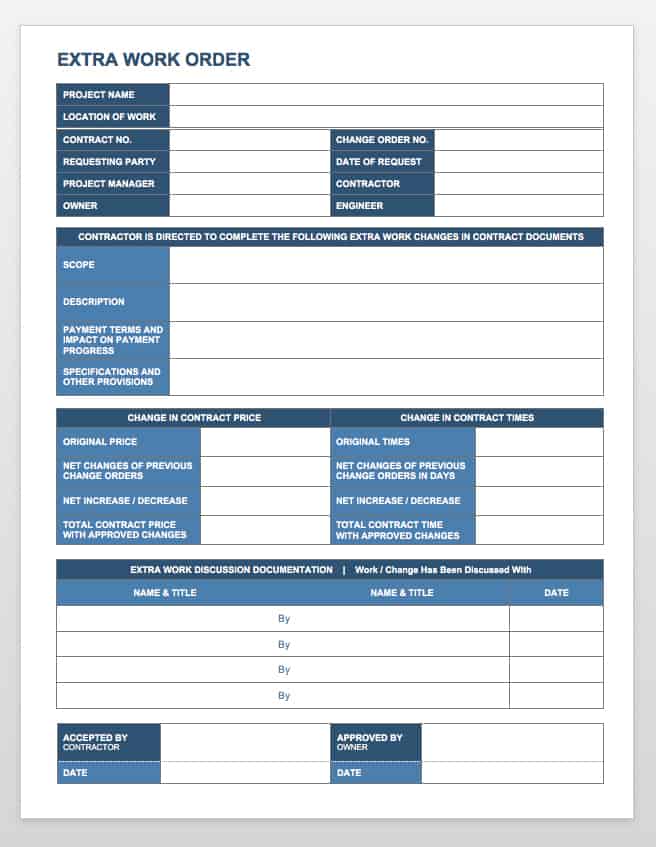
Source: Smartsheet
request for change order template
Source: Smartsheet
change order template pdf
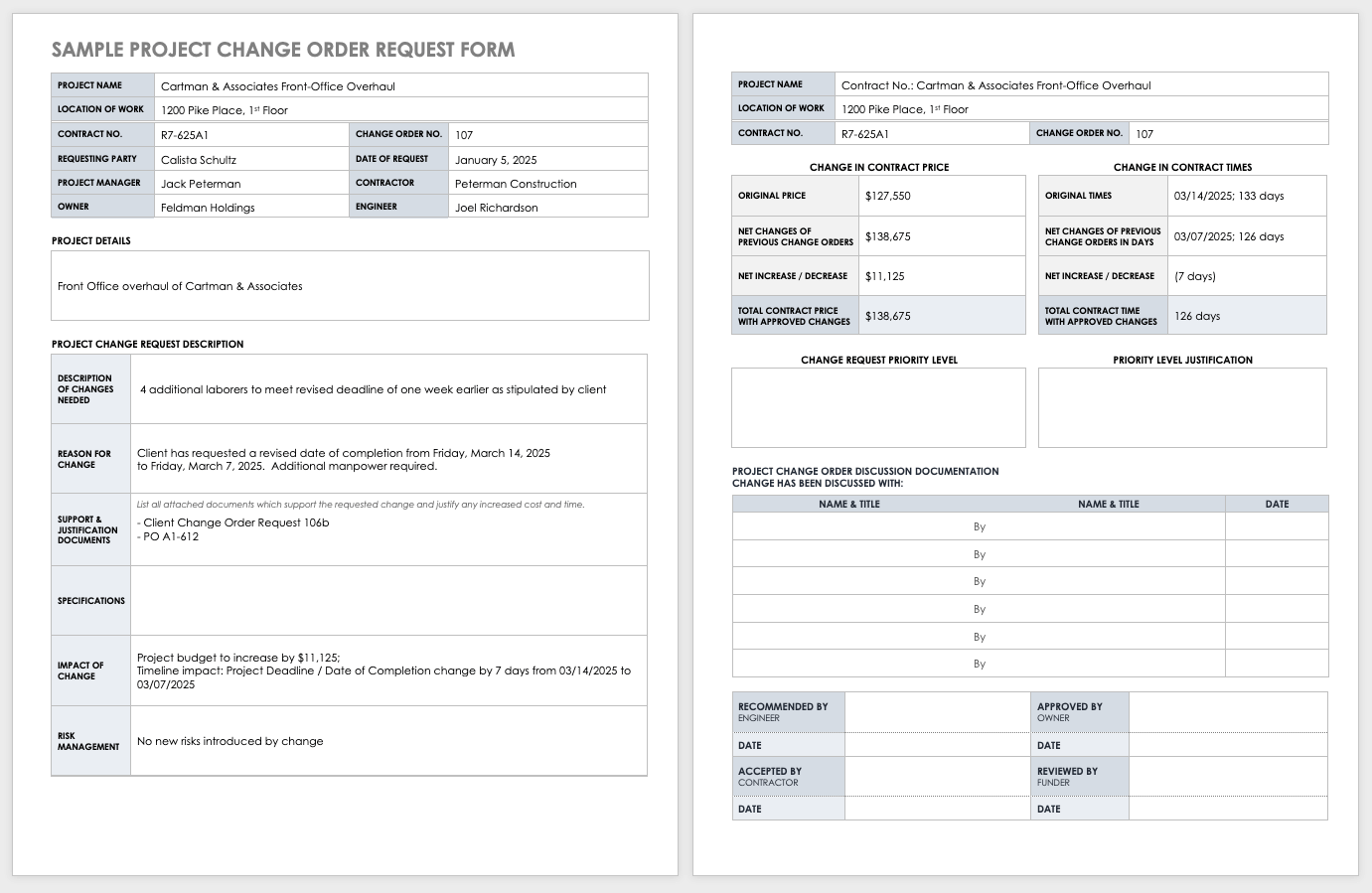
Source: Smartsheet
change order document template
Source: Smartsheet
Frequently Asked Questions
What should a client change order include?
A strong change order normally identifies the project and contract, describes the modification, explains why it is needed, shows the financial adjustment, states the schedule effect, identifies supporting documents, and provides the appropriate approval record.
Is a change order the same as a change request?
Not necessarily. A change request generally proposes or initiates a modification, while a change order commonly records an approved contractual change. The terminology and legal effect depend on the project contract.
Should every change order include a price?
Not every change affects price. A change can be zero-cost, deductive, or otherwise neutral financially. Even then, documenting the change can be valuable because the scope, specifications, schedule, or project record may still be affected.
Should schedule changes be included?
Yes, when the change affects project timing. The document should state the applicable increase or decrease in contract time and any resulting completion-date adjustment when required by the project agreement.
Which format is best: PDF, Word, or Excel?
Use Excel when detailed calculations are important, Word when narrative editing is important, and PDF when a stable client-facing approval record is needed. Many organizations use more than one format as part of the same workflow.
Can a client request a change by email?
An email can initiate a request or provide supporting evidence, but it should not automatically be treated as an approved change unless the contract and authorization process make that appropriate. The formal change documentation should establish the final agreed scope, price, time, and approval.
How should multiple change orders be tracked?
Use sequential change order numbers and maintain a central log showing status, value, schedule effect, approval date, and relevant references. This prevents approved changes from becoming disconnected from the current project baseline.
Should the original contract be attached to every change order?
Not necessarily. The change order should clearly reference the governing contract and identify the specific documents affected. Supporting attachments should be included when they are necessary to explain or substantiate the modification.
Conclusion
A well-designed change order template for clients turns project modifications into a clear, reviewable, and traceable process. The strongest templates connect the original contract to the revised scope, price, schedule, supporting documents, and approvals. Whether you use Word, Excel, PDF, or a combination of formats, the most important objective is consistency: every significant change should be understandable, properly evaluated, and recorded in a way that both the client and project team can rely on throughout the life of the project.
