A well-designed inventory template should do more than list product names and quantities. It should create a consistent structure for item identification, stock movements, locations, suppliers, reorder points, costs, and transaction history. When that structure is hosted in a cloud environment, the template can become a central operational reference rather than a static document that is updated occasionally.
The best solution depends on inventory complexity. A small business with a few dozen products may need only a shared spreadsheet with formulas and controlled data entry. A growing operation with multiple warehouses, purchasing workflows, barcode scanning, sales channels, and audit requirements may need a dedicated cloud application. Understanding that distinction helps prevent both under-engineering and unnecessary software costs.
Cloud inventory management also changes the way teams work together. Purchasing staff can review stock requirements while warehouse employees record movements, sales staff can check availability, and managers can monitor exceptions without waiting for someone to email an updated workbook. The central principle is simple: everyone should work from the same current inventory information.
This guide explains how to design and use an inventory template cloud based solution, when Excel or Google Sheets is sufficient, when dedicated software becomes preferable, which fields matter most, how to control inventory movements, and how to evaluate cloud inventory systems without choosing a product solely because it has a long feature list.
What Is an Inventory Template Cloud Based?
An inventory template cloud based is a pre-structured inventory tracking document or framework that is stored and accessed through an online environment. The template normally contains fields for products, stock quantities, locations, suppliers, costs, reorder levels, and transaction activity. The cloud component allows the information to be accessed through supported devices and shared with authorized users.
The template can take several forms. It might be an online spreadsheet, a workbook stored in a cloud drive, a database-style table, or the starting structure inside an inventory management application. The important distinction is that the template provides the data model, while the cloud environment provides shared access, storage, synchronization, and collaboration capabilities.
A useful template separates relatively stable information from frequently changing transactions. Product ID, SKU, description, category, unit of measure, and standard supplier information belong in a master item table. Receipts, sales, transfers, adjustments, returns, and stock counts belong in a transaction table. This separation makes calculations easier and creates a better history of what happened.
For example, a product record might contain SKU, product name, category, supplier, warehouse location, reorder point, target stock level, unit cost, and barcode. A separate transaction record might contain date, transaction type, SKU, quantity, reference number, location, and person responsible. The current stock can then be calculated from the transaction history instead of being changed arbitrarily in several places.
This structure is particularly important when several people update the inventory. If one employee directly edits a quantity while another records a receipt, the system can easily lose the relationship between the original quantity and the new movement. A transaction-oriented template provides a clearer audit trail and reduces the risk of unexplained changes.
Why Businesses Use Cloud-Based Inventory Templates
The main attraction of a cloud inventory template is accessibility. A warehouse employee can record a stock count from one device while an office manager reviews the same information from another location. Instead of maintaining separate local files, the business can establish a shared source of operational information.
Cloud access is also useful when inventory responsibilities are distributed across departments. Purchasing may need supplier and reorder information, warehouse staff may need location and quantity information, finance may need inventory valuation, and management may need summary indicators. A well-structured template can provide different views without forcing each department to maintain an independent dataset.
Another benefit is faster collaboration. Online spreadsheet platforms can support concurrent editing, comments, version history, and permission controls. These capabilities do not automatically make an inventory process accurate, but they can reduce the administrative friction associated with sending files between employees or maintaining multiple versions of the same workbook.
Cloud-based workflows can also make routine reviews easier. A manager can filter products below the reorder point, examine slow-moving items, compare stock by warehouse, or review recent adjustments without rebuilding a report from scratch. The value comes from consistent data structure rather than from the word “cloud” itself.
However, cloud storage does not solve poor inventory practices automatically. If product identifiers are inconsistent, staff do not record movements promptly, duplicate SKUs exist, or permissions are too broad, an online system can simply make bad information available faster. Process design remains the foundation of reliable inventory management.
Core Components of a Strong Inventory Template
The first component should be a unique item identifier. Every product, material, asset, or stock-keeping unit should have a stable ID or SKU. Names alone are unreliable because employees may abbreviate them differently or enter spelling variations. A unique identifier makes formulas, searches, barcode processes, and integrations more dependable.
The next component is descriptive information. Typical fields include item name, category, brand, model, unit of measure, supplier, and product status. The exact fields depend on the business. A food distributor may need expiration information, while a hardware distributor may need dimensions and packaging units. A service business might track consumable supplies instead of resale products.
Location fields are equally important when stock can exist in multiple places. A simple operation may need only warehouse and shelf. A larger organization may need site, warehouse, zone, aisle, rack, bin, and sub-location. The more locations exist, the more important it becomes to treat location as structured data rather than free-form notes.
Quantity fields should distinguish different inventory states when the business needs that detail. On-hand quantity, allocated quantity, available quantity, incoming quantity, damaged quantity, and reserved quantity can represent different operational realities. A basic template does not necessarily need all of them, but the design should not pretend that one number represents every possible stock state.
Finally, the template needs transaction records. Receipts increase stock, sales or issues decrease it, transfers move it, returns can increase or decrease it depending on the situation, and adjustments reconcile differences. Recording these movements systematically is what turns a list of products into an inventory management process.
Designing the Inventory Data Structure
A practical structure usually begins with an Item Master sheet or table. Each row represents one SKU, and each column represents one stable attribute. Keeping one row per item prevents duplicate product definitions and makes lookup formulas more reliable.
A second table can record inventory transactions. Useful columns include transaction ID, date, SKU, transaction type, quantity, source location, destination location, reference document, user, and notes. For a receipt, the source may be a supplier and the destination a warehouse. For a transfer, both source and destination locations matter.
A third area can contain stock summaries. This is where formulas calculate current quantities, inventory value, reorder status, and other indicators. Separating the summary from the transaction log makes the template easier to use because staff can enter movements without accidentally overwriting formulas.
Validation rules should be used wherever possible. Transaction types can be limited to a controlled list such as Receipt, Sale, Transfer, Return, Adjustment, and Count. Product IDs can be validated against the item master. This reduces spelling variations and prevents invalid entries from silently entering the dataset.
Formula-driven summaries are preferable to manually maintained totals. If a user changes a stock balance directly without recording the underlying movement, the business loses information about why the balance changed. A transaction log provides context and allows historical analysis, reconciliation, and troubleshooting.
Using an Inventory Template Cloud Based Excel Workflow
An inventory template cloud based excel workflow can be a strong starting point for small and moderately complex operations. Excel supports structured tables, formulas, filtering, conditional formatting, data validation, charts, and online collaboration. Microsoft also provides inventory templates that can be adapted to track products, supplies, equipment, and other assets.
The most effective Excel design uses a master inventory table rather than a collection of manually edited summary cells. A transaction log can record every stock movement, while formulas calculate totals by SKU and location. Conditional formatting can highlight low-stock products, unusual adjustments, or missing information.
Excel is particularly useful when a business already has staff who understand spreadsheets. There is less training friction, and the template can often be modified without waiting for a software developer. Columns can be added, reports can be customized, and formulas can be adapted as the inventory process evolves.
Online Excel also supports collaboration when the workbook is stored in an appropriate cloud location. Users can work on shared files, manage permissions, and maintain a common workbook instead of passing attachments around. This can be practical for teams that need a familiar spreadsheet interface while gaining online access.
The limitation is complexity. As the number of users, transactions, locations, integrations, and automation requirements grows, spreadsheet formulas can become difficult to maintain. At that point, a dedicated application may provide stronger controls, workflows, role-based access, transaction processing, and reporting.

When an Inventory Template Cloud Based Free Option Makes Sense
An inventory template cloud based free approach is often appropriate when the primary requirement is organized visibility rather than advanced automation. A small retailer, office, workshop, school department, or project team may only need a structured list, transaction history, reorder indicators, and shared access.
Free tools are especially useful during the discovery phase. Before purchasing specialized software, a business can map its products, locations, transaction types, approval requirements, and reporting needs in a spreadsheet. This process often reveals which fields and workflows are actually necessary.
A free template can also be useful for a temporary project. For example, a company performing a physical stocktake may need a structured sheet for counting, reconciliation, and exception reporting. After the count is complete, the resulting data can be cleaned and transferred into a more permanent system.
The important consideration is not whether a template costs money but whether the total process is sustainable. A free spreadsheet may become expensive indirectly if employees spend hours correcting duplicate entries, reconciling inconsistent quantities, or manually creating reports.
Free solutions therefore work best when the inventory scope is controlled, the number of users is manageable, transaction volume is reasonable, and someone is responsible for maintaining the template. Once those assumptions stop being true, the organization should reassess its operating model.
What to Know About Free Download Options
The phrase inventory template cloud based free download can describe several different workflows, and they should not be confused. A downloadable Excel workbook is not automatically a cloud system. It becomes part of a cloud workflow only when it is stored and managed in a cloud environment that supports the required access and collaboration model.
A downloadable template can still be valuable. It may provide a starting structure with fields, formulas, example categories, or formatting. The user can then adapt the workbook and place it into an approved cloud storage location. Before using a downloaded file, remove sample data and review formulas carefully.
Template provenance also matters. A file from an unknown website may contain unnecessary formulas, links, macros, or structures that do not fit the business. A reputable provider or official template library is generally preferable, particularly when the workbook will become an operational record.
Before deploying a downloaded template, test it with a small set of realistic transactions. Enter a receipt, sale, transfer, return, and adjustment. Check whether the resulting balances behave as expected. Also test sorting and filtering because poorly designed formulas can produce incorrect results when rows are moved or new data is added.
Finally, decide where the authoritative copy will live. If employees keep local copies after downloading the template, the organization can quickly end up with several competing versions. Establishing one controlled master file is more important than the visual appearance of the template.

Inventory Template Cloud Based Software Versus a Spreadsheet
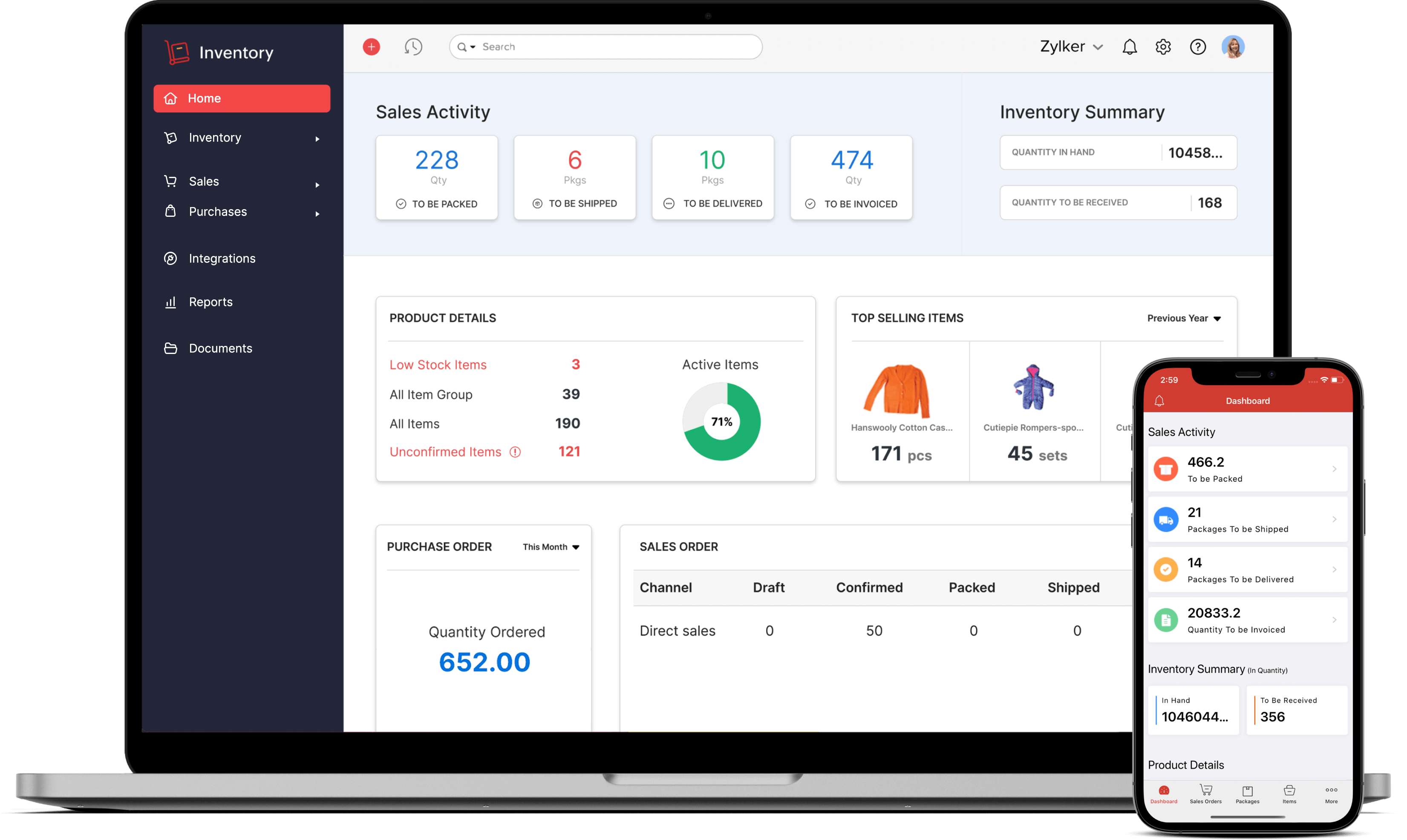
An inventory template cloud based software solution generally goes beyond the static structure of a spreadsheet. Dedicated inventory applications can provide product catalogs, stock transactions, purchase orders, sales orders, warehouse locations, barcode processes, user permissions, alerts, reporting, and integrations.
The distinction is important because software usually enforces more of the workflow. Instead of asking an employee to decide which spreadsheet cell to edit, an application may present a receiving screen that requires a product, quantity, location, and reference before the transaction is recorded.
Dedicated systems can also reduce the need for complex formulas. Current stock becomes a system-managed result of transactions, while dashboards and reports read from the underlying database. This architecture can be easier to scale when the number of products and movements increases.
Software may also connect inventory to other business processes. A purchase order can create expected stock, a receipt can update availability, an order can reserve stock, and a shipment can reduce available inventory. The exact workflow depends on the product and configuration, so businesses should evaluate real process support rather than assume that every application handles inventory in the same way.
The trade-off is cost and implementation effort. A dedicated application requires configuration, training, user administration, data migration, and ongoing governance. For a very small inventory, those costs may outweigh the benefits. For a growing operation, the additional controls can quickly become valuable.
Using Inventory Template Cloud Based Google Sheets
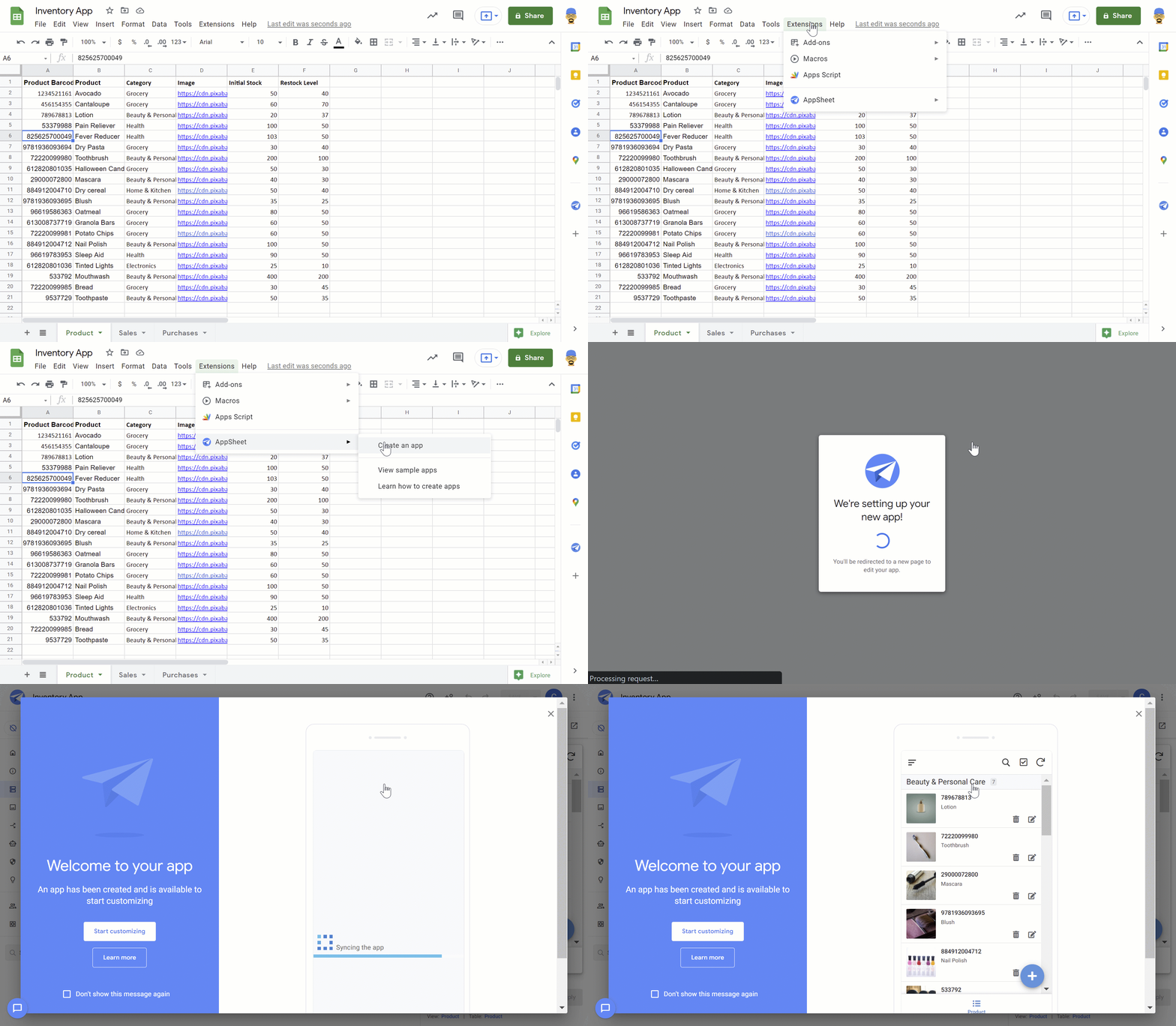
An inventory template cloud based google sheets workflow can be attractive to teams that already use Google Workspace. Google Sheets supports shared editing, comments, version history, filtering, formulas, and structured tables, making it possible to create a collaborative inventory tracker without building a custom application.
A useful Google Sheets design should still follow the same data principles as Excel. Create a product master, maintain a transaction log, and use a separate summary area. Avoid having several employees manually change the same quantity column because that makes it difficult to reconstruct the movement history.
Google Sheets can be especially effective for lightweight inventory processes involving office supplies, event materials, small product catalogs, project components, or simple stockrooms. It is also useful for teams that need quick collaboration between locations without introducing a specialized inventory platform.
As with Excel, access control should be deliberate. Employees who enter transactions may need editing rights, while managers or external stakeholders may need view-only access. Formula areas should be protected where practical so that accidental edits do not break the inventory calculations.
Google Sheets becomes less suitable when the workflow depends on complex warehouse operations, large transaction volumes, sophisticated barcode processes, high-frequency integrations, or strict transactional controls. In those situations, the spreadsheet can remain useful as an analysis or import/export tool while the operational system moves to dedicated software.
Understanding a Cloud Based Inventory System
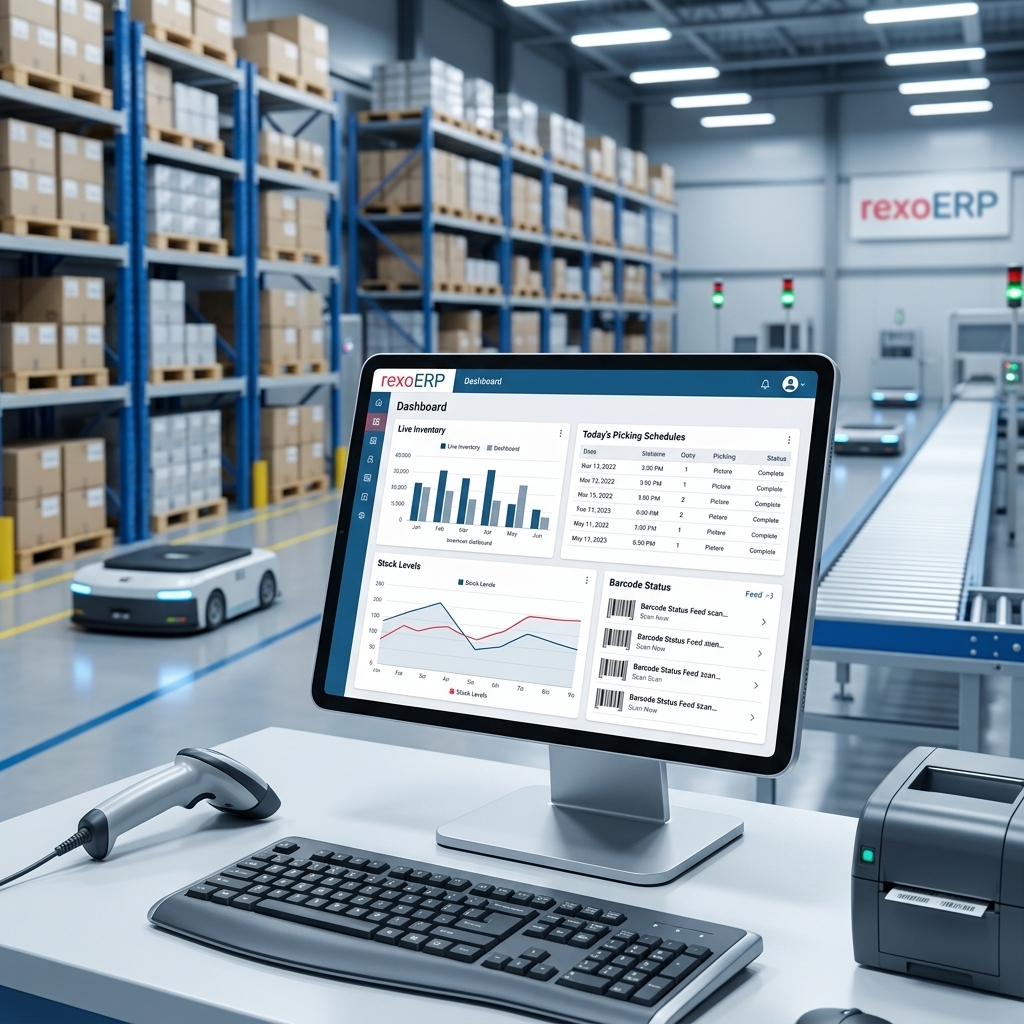
A cloud based inventory system is an online application or service that manages inventory data through hosted infrastructure rather than requiring the primary application database to operate solely on a local computer. Users generally access the system through a browser or connected application.
The central advantage is centralized information. Product definitions, transactions, locations, and reports can be maintained within one environment. When properly configured, users do not need to merge several files to understand the current inventory position.
A cloud system can also support distributed operations. A business with multiple warehouses may record receipts at one site while managers monitor aggregate inventory from another. Sales channels can potentially connect to the same inventory data, depending on the application’s integrations.
Cloud architecture can also simplify software maintenance because the provider manages the hosted application environment. However, businesses remain responsible for configuration, permissions, data quality, user training, and operational policies. Cloud hosting does not eliminate the need for governance.
Security should be part of the evaluation. Businesses should examine authentication options, user roles, audit logs, data export capabilities, backup policies, integration controls, and the provider’s security documentation. Inventory data can reveal commercially important information, so access should be limited to people who need it.
Cloud Based Inventory System Examples
Useful cloud based inventory system examples range from lightweight stock trackers to full warehouse and enterprise inventory platforms. A spreadsheet-based system is one example at the simple end. A dedicated inventory application with purchasing, sales, barcode scanning, and reporting represents a more advanced model.
Another example is a multi-location stock system. Imagine a retailer operating three warehouses. Each location records receipts and issues separately, while a central dashboard shows total stock, available stock, incoming purchases, and transfers between facilities.
A wholesale distributor provides another example. The distributor may need supplier records, purchase orders, receiving, customer orders, stock allocation, shipment confirmation, and reorder planning. A simple spreadsheet may support some of these activities, but dedicated software can connect them into one workflow.
A service business can use a cloud inventory system for equipment and consumables rather than resale products. Technicians may check tools in and out, record usage, and identify missing equipment. The same underlying inventory principles still apply: unique identifiers, locations, movements, responsibility, and reconciliation.
The best example for a particular business is therefore determined by process complexity, not industry label alone. Two retailers can have completely different inventory requirements if one sells 50 low-volume products from a single site while the other manages thousands of SKUs across multiple channels.

Cloud Based Inventory Management Application
A cloud based inventory management application normally provides a user interface for managing inventory records and transactions without requiring employees to maintain the underlying database themselves. The application may include purchasing, sales, warehouse, reporting, and integration functions.
When evaluating an application, start with daily workflows rather than the feature list. Ask how an employee receives stock, moves it between locations, records a damaged item, performs a stock count, processes a return, and investigates a discrepancy.
Mobile access can be important for warehouse teams. Employees may need to scan a barcode, check a bin location, enter a count, or confirm a movement without walking to a desktop computer. A mobile-friendly interface can therefore have a greater operational impact than a visually impressive management dashboard.
Integration is another consideration. An application may connect to accounting software, e-commerce platforms, point-of-sale systems, purchasing tools, shipping platforms, or enterprise resource planning systems. Each integration should be evaluated for data direction, synchronization frequency, error handling, and ownership of the authoritative record.
Reporting should also match management decisions. A dashboard is useful when it helps answer questions such as which products need replenishment, which locations have excess stock, where adjustments are occurring, or how inventory value is changing. Decorative charts without actionable context add little operational value.

Cloud Based Inventory Management Features to Prioritize
The most useful cloud based inventory management features are those that improve accuracy, visibility, control, and decision-making. Product master data, transaction processing, multi-location support, stock adjustments, reporting, and user permissions form the foundation.
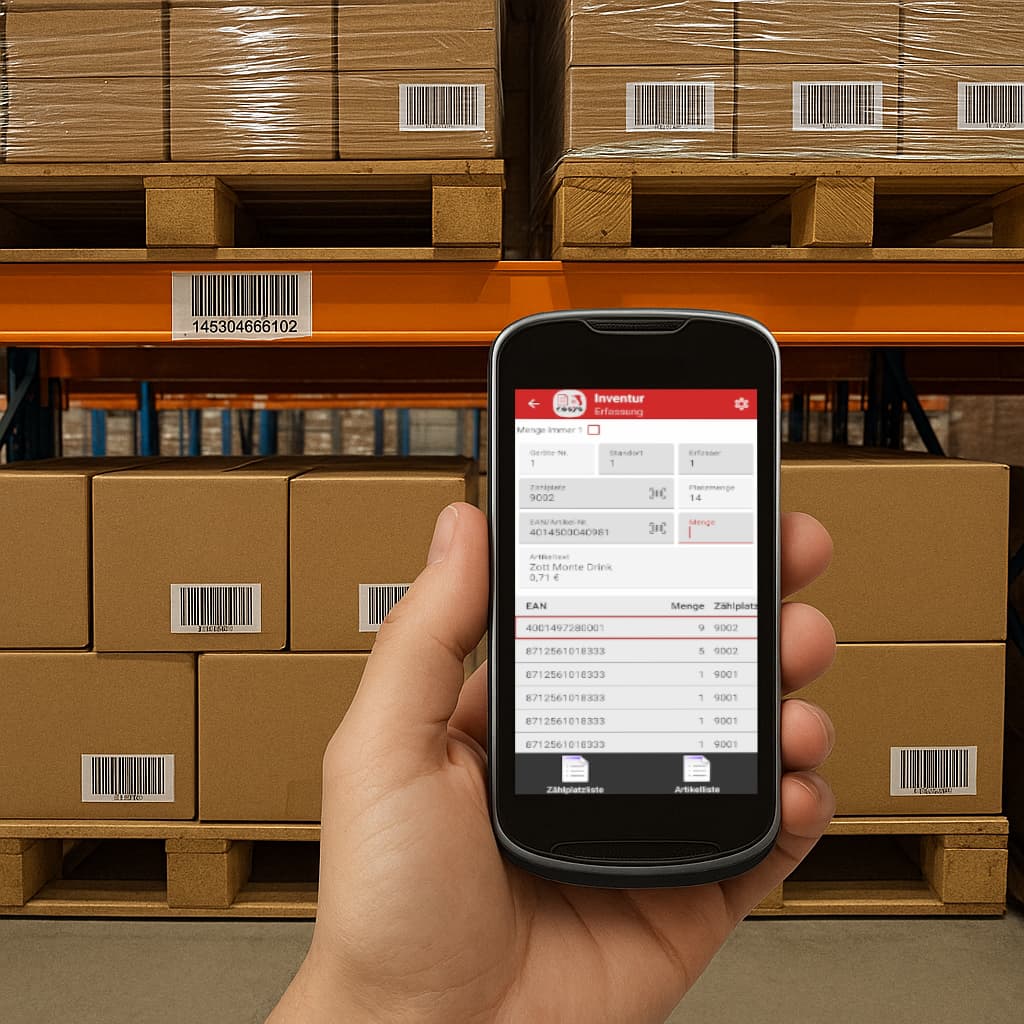
Barcode support can make physical operations faster because employees can identify items electronically rather than repeatedly typing long product codes. The quality of the process depends on label standards, scanner compatibility, product identifiers, and the application’s ability to handle exceptions.
Reorder management is another valuable capability. A system can compare current or available stock with predefined reorder levels and help identify items that need purchasing. More advanced approaches can consider lead times, demand patterns, minimum order quantities, and supplier constraints.
Auditability is especially important when inventory has significant financial value. A good system should make it possible to understand who recorded a transaction, when it occurred, what changed, and why an adjustment was made. This supports reconciliation and accountability.
Finally, look for practical reporting. Inventory aging, stock valuation, movement history, low-stock lists, adjustment reports, purchase commitments, and location summaries are often more useful than a large collection of generic dashboards.
Cloud Based Inventory System Features That Matter in Daily Operations
When reviewing cloud based inventory system features, distinguish between operational features and convenience features. Operational features directly affect stock accuracy, while convenience features may improve usability without changing the underlying process.
Real-time or near-real-time updates can be valuable when multiple sales or warehouse activities occur throughout the day. However, the phrase “real time” should be examined carefully. If an integration updates every 30 minutes, for example, users should understand that the inventory shown may not reflect the most recent external transaction.
Location control is another important capability. A system should make it clear where stock is physically stored and, where relevant, distinguish available inventory from reserved, damaged, quarantined, or incoming quantities.
Cycle counting can also be valuable. Instead of waiting for one large annual stocktake, organizations can schedule smaller counts for selected products or locations. Differences can then be investigated and adjusted using a documented process.
Finally, consider export and data portability. Even if the system works well today, the business should be able to retrieve its data in a usable format. Data portability reduces dependence on a provider and supports future migrations, audits, analysis, and archival requirements.

Cloud Based Inventory Management Tools for Different Business Sizes
Small businesses often need simplicity first. A shared spreadsheet, barcode scanner, clear SKU convention, and basic reorder calculation may be sufficient. The goal should be to create a reliable process that employees can actually maintain.
Growing businesses may benefit from a dedicated inventory platform when the number of transactions increases. At this stage, manual reconciliation becomes more time-consuming, and the business may need purchase orders, sales integration, warehouse locations, user roles, and automated alerts.
Mid-sized organizations often need more advanced controls. They may have several warehouses, multiple sales channels, purchasing teams, finance requirements, and different user roles. Integration and auditability become increasingly important because inventory data is used by several business processes.
Larger organizations may require enterprise inventory capabilities that connect inventory with procurement, manufacturing, logistics, financial accounting, and planning. At this level, implementation methodology and data governance can matter as much as individual software features.
The best choice is therefore not necessarily the tool with the most capabilities. A system is valuable when its complexity matches the organization’s needs. Too little structure creates errors, while too much structure can make routine work slow and encourage employees to create unauthorized workarounds.
Building a Practical Inventory Dashboard
A dashboard should turn inventory data into decisions. The first panel might show total units, total inventory value, low-stock items, incoming stock, and items requiring review. These indicators provide a quick operational overview without forcing the manager to inspect every row.
The next layer can focus on exceptions. Products below reorder point, negative available quantities, unusually large adjustments, unreceived purchase orders, and inactive SKUs can be displayed as action lists. Exception reporting is often more useful than displaying hundreds of normal records.
Trend charts can provide additional context. Monthly purchases, sales, inventory value, stock turnover, or adjustment frequency can reveal patterns that are difficult to see in a raw table. The dashboard should allow users to move from the summary to the underlying records when investigation is required.
Filters should reflect the organization’s decision structure. Useful filters may include warehouse, category, supplier, product status, date range, and stock condition. Avoid creating dozens of filters that no one uses because excessive interface complexity can reduce adoption.
Most importantly, every dashboard metric should have a clear definition. “Available stock,” for example, might mean on-hand minus reserved quantities, while another business might define it differently. Documenting metric definitions prevents departments from making decisions based on different interpretations of the same number.

How to Create an Inventory Template Cloud Based Step by Step
Start by listing every inventory process that currently occurs. Include purchasing, receiving, storage, sales, picking, shipping, returns, transfers, adjustments, stock counts, damaged goods, and disposal. This process map prevents the template from being designed around only the easiest part of inventory management.
Next, define the item master. Decide which fields are mandatory and establish a unique identifier for every SKU. Standardize units of measure and category names before entering large amounts of data. If one product can be purchased by the case and sold individually, define how those units relate.
Then create the transaction structure. Decide which events change stock and how each event should be recorded. Use controlled transaction types and require enough information to explain the movement later.
After that, build the calculations. Current stock can be derived from opening balances plus receipts and positive adjustments minus issues, sales, and negative adjustments, with transfers handled between locations. Inventory value can be calculated using the selected valuation approach appropriate to the business and accounting requirements.
Finally, test the system using realistic scenarios. Do not test only a simple purchase. Test partial receipts, returns, transfers, damaged stock, duplicate entries, cancelled orders, stock counts, and negative balances. A template is ready for wider use only when it behaves predictably under the situations employees actually encounter.

Inventory Accuracy: Data Collection and Stock Counts
Inventory accuracy begins with physical identification. Employees should be able to distinguish one SKU from another without relying on memory. Barcodes, labels, product IDs, and standardized descriptions can reduce ambiguity during receiving and counting.
Stock counts should have a defined method. Decide whether employees count blind, where the expected quantity is hidden, or whether they compare physical counts with the system quantity. Blind counting can reduce confirmation bias, while visible expected quantities may speed routine checks. The appropriate approach depends on the purpose of the count.
Count differences should be investigated rather than immediately adjusted. A discrepancy can result from an unrecorded receipt, picking error, incorrect location, damaged product, duplicate transaction, unit-of-measure problem, or simple counting mistake.
Cycle counting can distribute the workload throughout the year. High-value or fast-moving products may be counted more frequently than low-value, stable items. The frequency should reflect business risk rather than follow an arbitrary schedule.
The final step is reconciliation. Once a difference has been confirmed, record the adjustment with an explanation and responsible user. This creates a historical record and helps identify recurring process failures that should be corrected instead of repeatedly adjusted.
Using Inventory Data for Reorder Planning
Reorder planning should consider more than the current quantity. A product with 20 units may be healthy if demand is low and replenishment is immediate, but it may be dangerously low if the product sells quickly and the supplier needs several weeks to deliver.
A basic template can use a reorder point and target stock level. When available quantity falls below the reorder point, the item is flagged for review. The target level determines how much stock the business would like to hold after replenishment.
More advanced planning can incorporate supplier lead time, minimum order quantities, purchase multiples, seasonal demand, and safety stock. These variables should be introduced only when the organization has reliable data because complicated formulas based on poor assumptions can produce false confidence.
Incoming inventory should also be visible. If 100 units are already on an open purchase order, purchasing staff may not need to order another 100 simply because current stock is low. A good system distinguishes on-hand, committed, reserved, and incoming quantities.
Reorder decisions should remain reviewable. Automated recommendations can save time, but a person may need to consider discontinued products, supplier problems, promotions, seasonal changes, or unusual customer orders before approving a purchase.
Inventory Valuation and Financial Considerations
Inventory tracking and inventory valuation are related but not identical tasks. A stock tracker tells the business what quantities it has and where they are, while valuation determines the financial value assigned to those quantities under the organization’s accounting approach.
A simple operational template may calculate an estimated stock value by multiplying quantity by a unit cost. This can be useful for internal planning, but businesses should not assume that a spreadsheet calculation automatically satisfies formal accounting requirements.
Cost data should be maintained carefully. If supplier prices change, the template needs a defined method for handling those changes. Mixing historical purchase prices with current replacement costs without labeling them can create misleading reports.
Inventory adjustments should also be visible to finance and management. Shrinkage, damage, write-offs, and counting differences can affect both operational performance and financial results. A transaction history makes these events easier to analyze.
When inventory is financially significant, the operational system and accounting process should be coordinated. The exact integration and valuation methodology should be established with the organization’s accounting professionals rather than inferred from a generic spreadsheet template.

Common Inventory Template Mistakes
One common mistake is creating a single giant sheet that mixes product definitions, current balances, transaction history, supplier details, and reports. This can work briefly, but it becomes difficult to maintain as soon as the inventory grows.
Another mistake is allowing employees to type product names instead of selecting standardized identifiers. Small spelling differences can create duplicate products that look separate to formulas and reports. A SKU or product ID should be the primary reference.
Hard-coded totals are another risk. If an employee types a new stock balance directly into a summary field, there may be no explanation for the change. Transaction-driven calculations are more auditable and easier to troubleshoot.
Insufficient permissions can create another problem. Everyone should not necessarily have the ability to edit formulas, master product records, or historical transactions. Role-based access and protected calculation areas can reduce accidental changes.
Finally, businesses often underestimate data cleanup. Moving from an old spreadsheet to a new system without removing duplicate SKUs, inconsistent units, obsolete products, and incomplete supplier records simply transfers the underlying problems into a new environment.

Best Practices for Cloud Inventory Governance
Assign an inventory data owner. This person or team should be responsible for product master standards, user permissions, template changes, and the definition of important metrics. Without ownership, shared files and systems tend to accumulate inconsistent practices.
Document important rules. Define how SKUs are created, how locations are named, when transactions must be entered, how adjustments are approved, and how inactive products are handled. Short written rules can prevent significant confusion.
Review access regularly. Employees change roles, leave organizations, or take on new responsibilities. Permissions should be updated accordingly, particularly when inventory information is commercially sensitive or when users can change transactions.
Monitor exceptions rather than attempting to inspect everything. Reports for negative stock, unusual adjustments, inactive products with remaining quantities, repeated count differences, and delayed receipts can help managers focus attention where it matters.
Maintain a recovery plan. Even cloud systems should have documented procedures for exporting data, handling integration failures, responding to outages, and restoring normal operations. Business continuity should not depend on the assumption that an online service will always be available.
Practical Solution: Implement an Inventory Template Cloud Based Workflow
The practical solution is to begin with a controlled inventory template cloud based workflow and expand it only when operational needs justify additional complexity. Start by defining products, locations, transactions, users, and reports before selecting software.
For a small business, create four core areas: Item Master, Transactions, Stock Summary, and Dashboard. Store the workbook in an approved cloud environment, establish editing permissions, and protect formula cells. Make the transaction log the primary method for changing stock.
For a larger business, use the same conceptual structure when evaluating dedicated software. Ask vendors to demonstrate receiving, picking, transfers, adjustments, counting, purchasing, reporting, and data export using scenarios that resemble the organization’s actual work.
Introduce barcode scanning only after SKU and location standards are stable. Automation cannot compensate for ambiguous product identifiers. Once identifiers are reliable, scanning can reduce manual entry and make physical movements easier to record.
Review the system after several weeks of real usage. Identify which fields employees skip, which transactions require workarounds, which reports managers actually use, and where discrepancies still occur. Improve the workflow based on observed behavior rather than assumptions made during initial implementation.

Reference Examples
inventory template cloud based excel
Source: Snowbeasts
inventory template cloud based free

Source: Wikimedia Commons
inventory template cloud based free download

Source: LinkedIn
inventory template cloud based software
Source: Zoho Inventory
inventory template cloud based google sheets
Source: Google Workspace
cloud based inventory system
Source: rexoERP
cloud based inventory system examples

Source: Behance
cloud based inventory management application
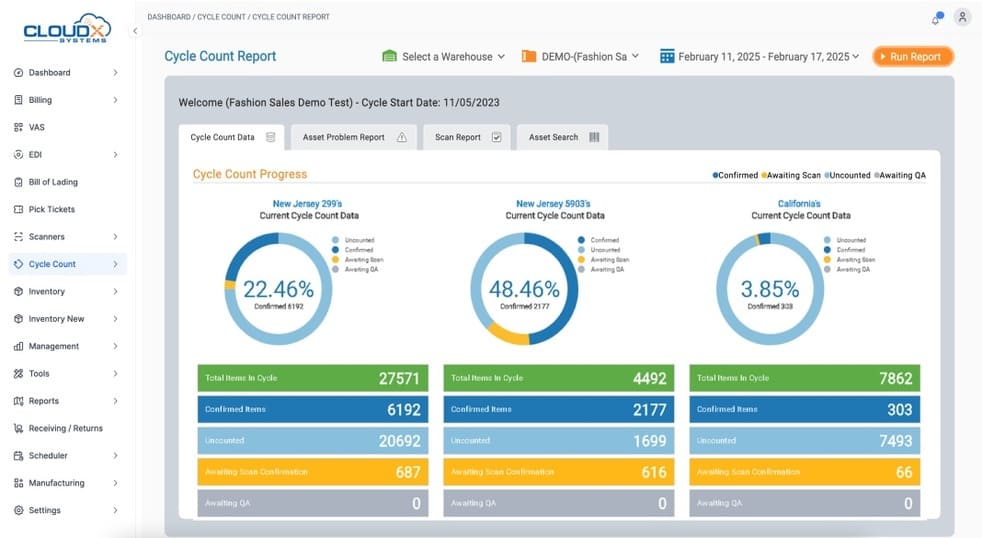
Source: CloudX Systems
cloud based inventory management features
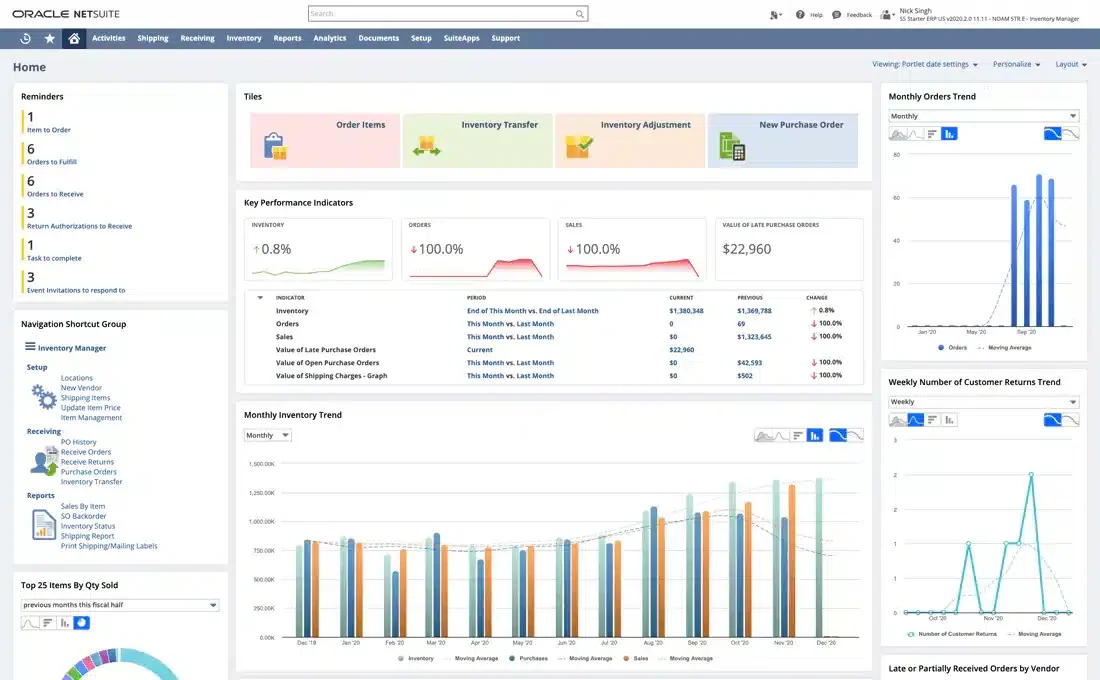
Source: HashMicro
cloud based inventory system features

Source: Technavio
cloud based inventory management tools

Source: IssueWire
free cloud based inventory system
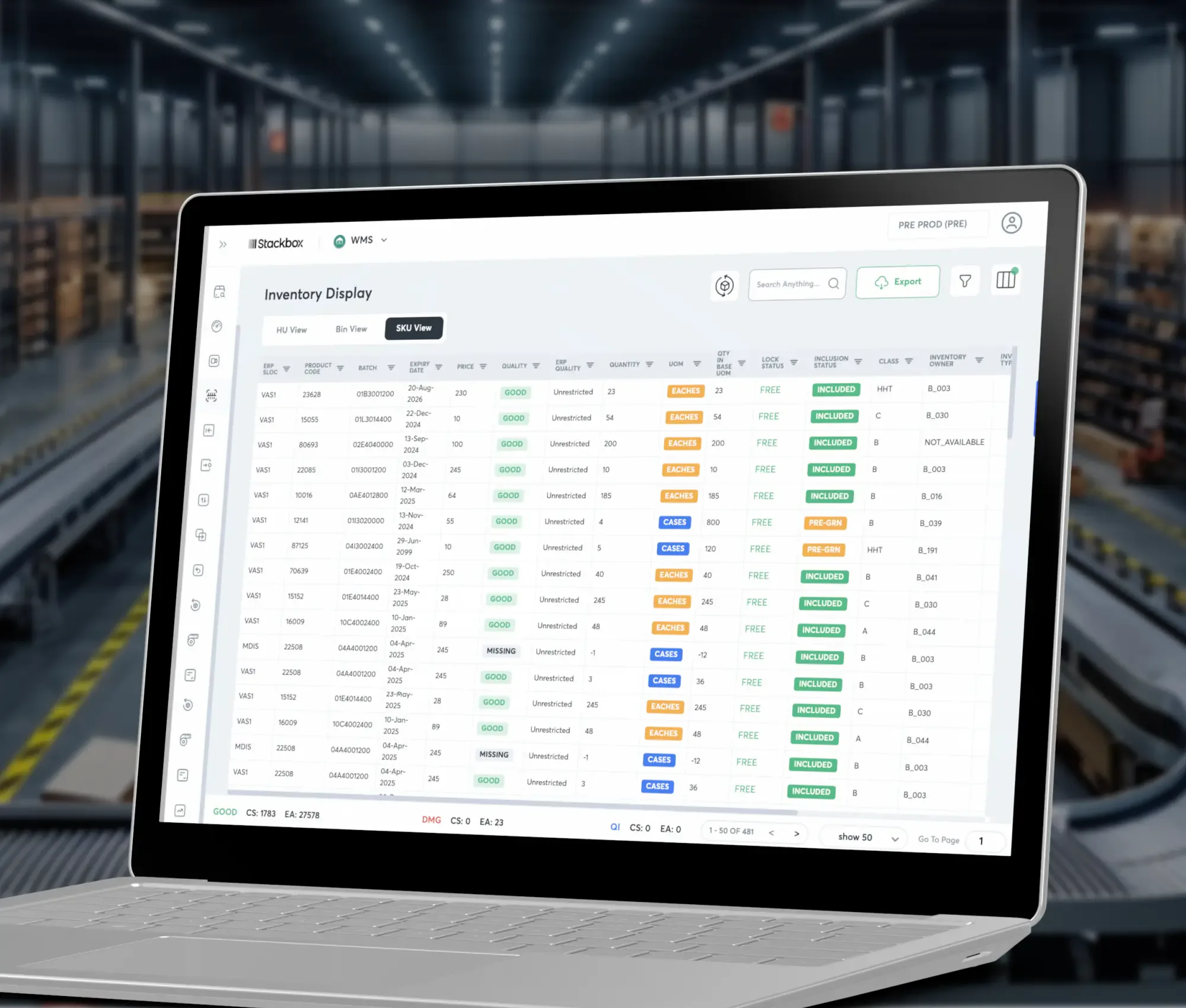
Source: Capterra
Frequently Asked Questions
What is an inventory template cloud based solution?
It is a structured inventory template maintained in an online environment so authorized users can access and update shared stock information. It may be a cloud spreadsheet or the initial structure of a dedicated inventory application.
Is a cloud inventory template better than Excel?
Not automatically. Excel can be highly effective for smaller and moderately complex inventories. A dedicated system becomes more attractive when transaction volume, users, locations, integrations, automation, or audit requirements make spreadsheet management difficult.
Can a free inventory template support a small business?
Yes. A small business may only need product IDs, quantities, locations, reorder levels, suppliers, and a transaction log. The important issue is whether the template is consistently maintained and protected from accidental changes.
What should an inventory template include?
At minimum, consider a unique item ID, product name, category, unit, location, quantity, reorder point, supplier, unit cost, transaction type, transaction date, and transaction reference. Additional fields should reflect the actual workflow.
When should a business move from a spreadsheet to inventory software?
Consider moving when manual reconciliation becomes frequent, multiple users create conflicts, several locations need centralized visibility, barcode processes become important, integrations are required, or managers need reliable transaction-level audit trails.
How can a cloud inventory system reduce errors?
It can reduce errors by standardizing product identifiers, controlling data entry, recording transactions consistently, restricting permissions, and reducing duplicate copies of inventory information. These benefits depend on good configuration and disciplined usage.
What is the difference between on-hand and available inventory?
On-hand inventory normally represents physical stock recorded at a location, while available inventory may exclude quantities already reserved or allocated to orders. The exact definitions should be documented within the business system.
Should inventory adjustments be allowed?
Yes, legitimate adjustments are necessary when physical counts and system records differ. However, adjustments should require an appropriate reason and, where necessary, approval so that they do not become a substitute for recording normal inventory movements.
Is barcode scanning necessary for cloud inventory?
No. A simple inventory may work without barcodes. Barcode scanning becomes more valuable as product counts, transaction frequency, warehouse size, or identification complexity increases.
How often should inventory data be reviewed?
Review frequency should match inventory risk. High-value or fast-moving items may require frequent cycle counts and exception reviews, while stable low-value items may be checked less often. The important point is to establish a repeatable process.
Conclusion
An inventory template cloud based solution can provide a practical bridge between manual stock lists and dedicated inventory software. The strongest approach begins with clean product identifiers, consistent locations, transaction-based stock movements, clear ownership, and controlled access.
For smaller operations, cloud spreadsheets can provide an affordable and flexible foundation. Excel and Google Sheets can support structured item records, formulas, validation, reporting, and collaboration when the inventory process is relatively straightforward.
For growing organizations, dedicated cloud inventory applications can add stronger transaction controls, barcode workflows, multi-location management, integrations, dashboards, and auditability. The right choice depends on operational complexity rather than the number of features advertised by a provider.
Regardless of the technology, inventory accuracy comes from disciplined processes. Every receipt, issue, transfer, return, adjustment, and count should have a clear place in the workflow. Reports should be based on consistent definitions, and exceptions should be investigated rather than hidden through unexplained corrections.
A well-designed inventory template cloud based system should ultimately make inventory easier to understand, easier to control, and easier to act on. Start with the simplest structure that reliably supports the business, measure where it becomes difficult to maintain, and add automation or dedicated software only when those improvements solve a demonstrated operational problem.
The most effective inventory template cloud based workflow is therefore not the most complicated one; it is the one that gives the right people accurate, timely, understandable inventory information and makes every important stock movement traceable from the moment it enters the business to the moment it is sold, consumed, transferred, returned, or removed.
